

For companies with teams working in the field, customer service does not end when a case is created or a call is answered. The real work usually happens later: assigning the right technician, finding a suitable appointment window, checking availability, planning the route, making sure the technician has the right information, updating the customer, completing the visit and reporting back to the business.
When that process is managed through spreadsheets, phone calls, disconnected calendars or manual updates, small issues quickly become expensive. A technician may be sent to the wrong location. A dispatcher may spend too much time rearranging appointments. A customer may wait without updates. A job may be completed, but the office team may not have the right information for invoicing, follow-up or reporting. This is where Agentforce Field Service & Operations comes in.
Salesforce now uses Agentforce Field Service & Operations for the product area many teams still know as Field Service Lightning, FSL, Salesforce Field Service or simply Field Service. For readability, we’ll use Field Service throughout this article. The core need remains the same, helping companies manage work that happens outside the office.
In 2026, Field Service is no longer just about scheduling technicians. AI, route optimization, mobile access and customer self-service are changing how modern field teams plan, deliver and measure service.
What Field Service Does
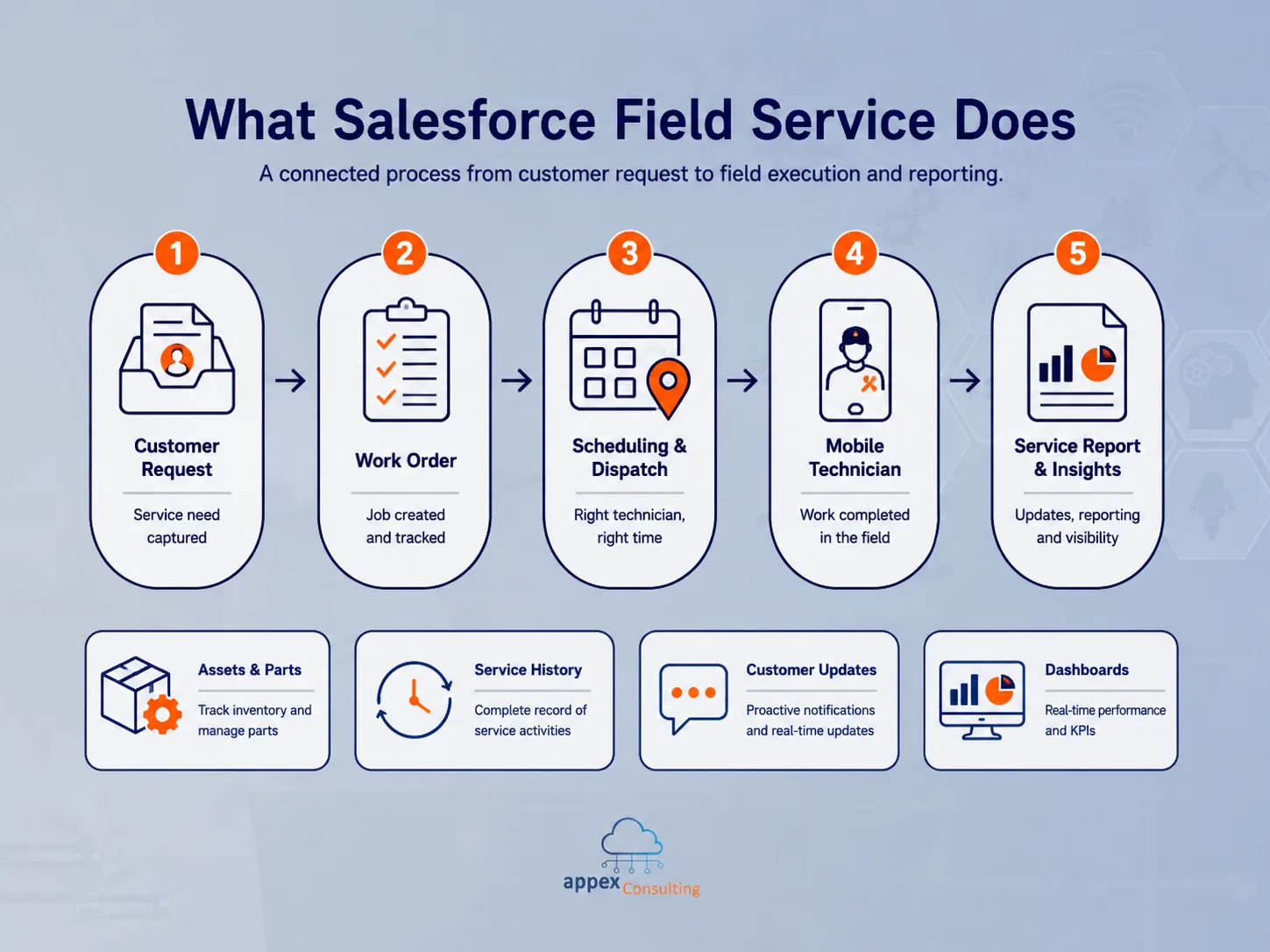
Field Service helps companies manage field operations from inside the Salesforce platform. A customer request can become a work order. That work order can be linked to a service appointment. A dispatcher can assign it to the right technician. The technician can view the job on a mobile app, complete the work, capture notes or signatures and update the record from the field. Managers can then track performance through reports and dashboards.
For a service business, this creates a more connected process than managing appointments in one system, customer information in another and technician updates through calls or messages.
The main building blocks usually include work orders, service appointments, scheduling, dispatching, service territories, mobile workers, skills, customer assets, products or parts, mobile access, customer notifications and reporting. The value comes when those building blocks reflect how the business actually operates. A company that installs equipment, performs inspections, completes maintenance visits or sends technicians to customer locations needs more than a calendar. It needs a reliable operating model for field work.
Why Field Service Matters More In 2026
Customer expectations have changed. People are used to real-time updates, shorter waiting windows and more transparency. They do not want to call multiple times to confirm when someone will arrive. They do not want a technician showing up without the right information. They do not want to explain the same issue again after already speaking with customer service.
At the same time, field teams are under pressure to do more with the same resources. Travel time, technician availability, urgent requests, cancellations and customer expectations all affect the quality and cost of service.
Field Service helps bring these moving parts into one place. The dispatcher can see appointment demand, technician availability and location-based constraints. The technician can see job details, customer history and required steps. The customer can receive updates or book appointments through a portal or customer-facing experience. Managers can see which teams are overloaded, which jobs are delayed and where service capacity is being used.
For many businesses, Field Service becomes the operational layer between customer service, mobile teams, finance and leadership. It connects the request, the appointment, the field visit and the reporting that follows.
Route Optimization Is Where Field Service Becomes Practical
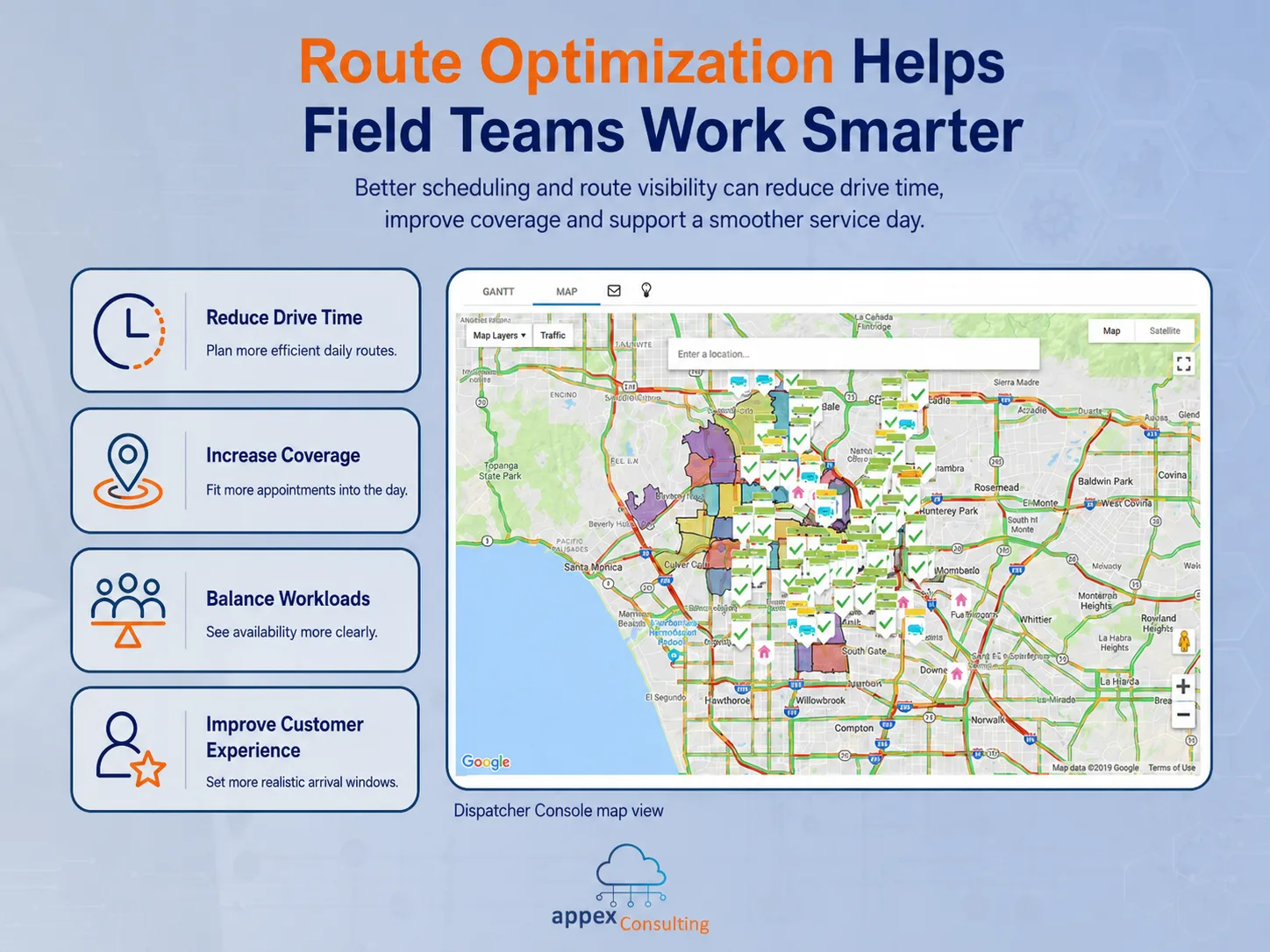
Route optimization is one of the most important parts of modern field service. Salesforce describes route optimization as the use of data such as customer locations, traffic patterns and field service technician availability to create more cost-effective and efficient routes. In practice, this can reduce wasted travel time, improve appointment coverage and help teams make better use of the working day.
Imagine a dispatcher starts the morning with 30 service appointments, 8 technicians, different territories, different skills, urgent requests, customer time windows and a few last-minute cancellations. Without optimization, the dispatcher has to balance all of that manually while trying to avoid overlaps, long travel times and missed appointments. That work is difficult even for an experienced dispatcher. It becomes harder when the schedule changes during the day.
With Field Service scheduling and optimization, the business can define the rules that matter: operating hours, territories, skills, appointment windows, travel time, job priority and technician availability. The system can then help create a better schedule based on those constraints. This does not remove the need for dispatchers. It gives them a better starting point and more visibility when things change.
Route optimization matters because small inefficiencies add up quickly. Ten minutes lost between appointments may not sound like much. Across several technicians, every working day, it becomes a serious cost. Better scheduling can also improve customer experience because appointments are planned more realistically and delays are easier to manage.
AI In Field Service Should Start With Real Operational Problems
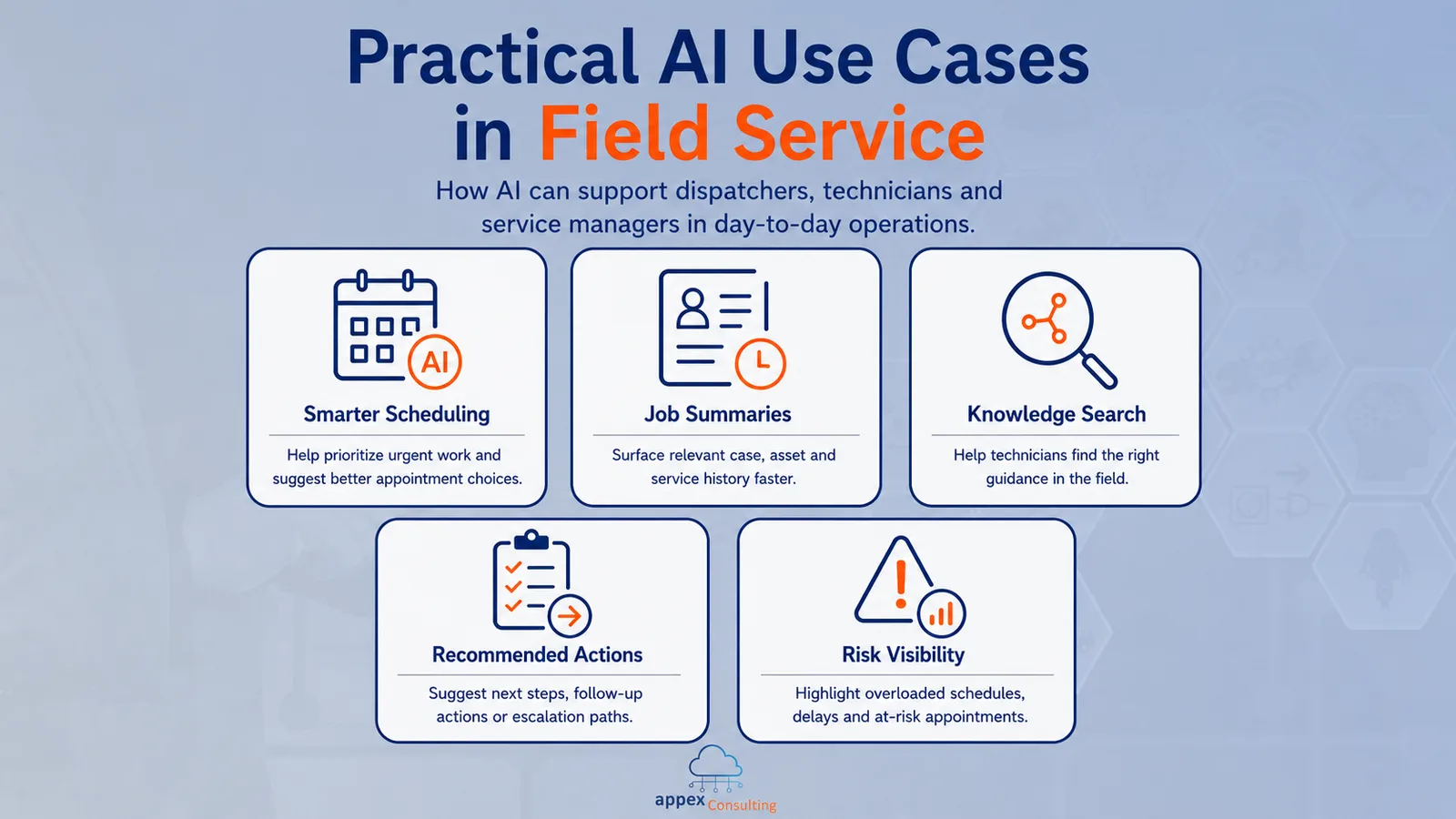
AI is now part of the Field Service conversation, but it should stay connected to real operational problems. The strongest AI use cases in field service are usually practical. They help dispatchers make faster decisions, help technicians access information more easily or help managers understand where service operations are under pressure.
For example, AI-assisted field service can support scheduling decisions when priorities change, suggest the best resource or appointment window, surface relevant job history, help technicians find service information, summarize completed work or highlight at-risk appointments.
The important point is that AI depends on the same foundation as the rest of Field Service. If service territories are unclear, technician skills are not maintained, job data is incomplete or appointment rules are inconsistent, AI will struggle to produce reliable results.
A field service AI assistant can help, but it cannot fix a broken operating model on its own. The right starting point is to make the field service process clear first. Then AI can support specific moments in that process, such as helping a dispatcher understand a scheduling issue, helping a technician find the right information or helping a manager spot patterns across appointments.
A Practical Field Service Use Case
A good Field Service use case starts with a simple business problem, customers need visits, and the business needs to manage those visits consistently.
Imagine a service-based company with a mobile workforce. Customers request appointments through the office, a website or a customer portal. The business needs to understand what the customer needs, create the right service record, schedule the visit, assign the right technician, capture what happened during the appointment and report on the outcome.
With Agentforce Field Service & Operations, that process can become much more connected.
A customer request can create a case or work order. The dispatcher can schedule a service appointment based on territory, availability, skills and customer preference. The technician can receive the appointment on the Field Service mobile app, review the job details and update the visit from the field. If products, parts, equipment or assets are involved, they can be tracked against the job. After the appointment, the business can generate service reports, update the customer and review operational performance through dashboards.
Self-service can also become part of the experience. A customer portal can allow customers to request appointments, see service history, raise cases or choose from available time slots. That reduces manual coordination, but only if the process behind it is reliable. The appointment options need to reflect real availability, the right Salesforce records need to be created, and the dispatcher and technician need access to the same information.
The mobile experience is just as important. Technicians are not sitting at a desk with time to search through multiple systems. They may be travelling, working in areas with weak connectivity, speaking with customers or completing work under time pressure.
The Field Service mobile app can give technicians access to appointment details, customer information, service history, tasks, notes, assets and forms from the field. Depending on the setup, they may also capture photos, signatures, product usage, completion notes or service report information.
For the customer, this can mean clearer communication and a smoother service experience. For the technician, it means fewer calls back to the office and better access to the information needed to complete the job. For managers, it creates visibility into how field operations are actually performing. The most useful Field Service implementations usually start with this kind of end-to-end process, not with isolated features.
What To Prepare Before Implementing Field Service
Field Service can create a lot of value, but it needs careful preparation. Before building, the business should be clear on how service work actually happens today. How do requests come in? Who qualifies them? How are appointments scheduled? How are technicians assigned? What information is needed on site? What happens when a job cannot be completed? How does the business measure service performance?
A practical readiness checklist includes:
- Service territories
- Operating hours
- Technician availability
- Required skills
- Work types
- Appointment rules
- Emergency or priority handling
- Customer communication requirements
- Mobile app requirements
- Asset or equipment tracking
- Products or parts used during service
- Service reports
- Invoicing handoff
- Dashboards and KPIs
- Integrations with finance, ERP or other systems
These decisions matter because Field Service reflects the operating model of the business. If that operating model is unclear, Salesforce will expose the gaps.
A rushed implementation can still produce a schedule and mobile records, but it may not create the visibility or efficiency the business expected. The setup also needs to consider the people using the system every day. If the mobile app is too complex, technicians may avoid it or update records later from memory. If reporting is left until the end, the business may go live without the metrics leadership actually needs. A better implementation starts by simplifying the process, then configuring Salesforce around it.
How Appex Can Help With Field Service
Field Service works best when it is designed around real operations, not just product features. At Appex, we help businesses implement and optimize Salesforce in a way that connects process, data, automation and user experience. For field service teams, that can include setting up work orders, service appointments, scheduling, dispatcher workflows, mobile access, customer portals, reporting, automation and ongoing support.
A good starting point is usually a focused review of the current service process. How are appointments created today? How are technicians assigned? Where do delays happen? What information is missing in the field? Which tasks are still manual? Which KPIs does leadership need to trust? From there, Agentforce Field Service & Operations can be designed around the way the business actually delivers service.
We have seen this in practice through a recent Agentforce Field Service & Operations implementation for a service-based business with a mobile workforce. The project focused on bringing day-to-day field operations into Salesforce, including work order management, appointment scheduling, technician dispatch, customer self-service, mobile workforce enablement, service reporting and operational dashboards.
The main takeaway was that Field Service works best when it reflects how the business actually operates, not just how the software is configured. Route optimization, mobile access and AI-assisted workflows can create real value, but only when they are built on clear processes, reliable data and a setup that matches how teams actually work in the field.
If your field service process still depends on spreadsheets, manual scheduling or disconnected updates, it may be time to review whether Agentforce Field Service & Operations can help your team work with more visibility and less friction.