

The Salesforce demo looked perfect. The dashboards made sense. The pipeline was clean. The automations seemed to remove the manual work your team complained about. Leadership could finally see how the business would run from one source of truth. Sales, service, marketing, operations and finance would all have the information they needed.
Then the system went live. Salespeople started skipping fields. Managers stopped trusting the reports. Customer data looked different depending on where you checked. Automations created more confusion than efficiency. Slowly, teams returned to spreadsheets, Slack messages, email threads, or whatever workaround helped them get through the day.
At that point, the question usually becomes, did Salesforce fail? In most cases the answer is no.
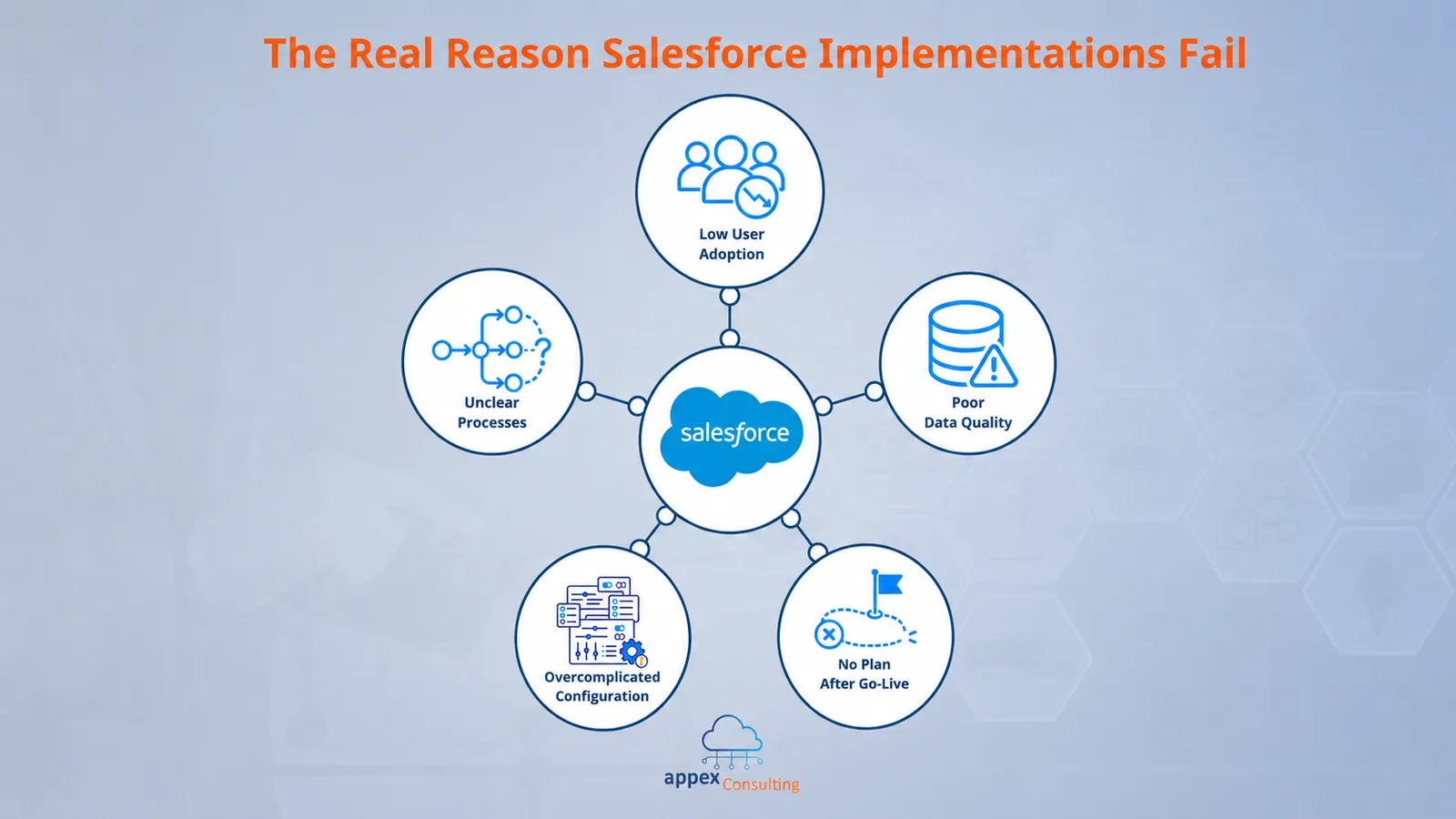
Salesforce implementations rarely fail because the platform is not powerful enough. They fail because the business treats Salesforce like a software installation, instead of a change in how processes, data, people, tools and ownership work together.
Salesforce can support sales, service, marketing, field operations, analytics, collaboration, AI agents and more. But it does not automatically redesign the way a company works. It does not magically clean years of messy data. It does not convince users to change habits overnight. And it does not keep improving itself after go-live.
That work has to be designed.
Salesforce was treated like software, not business change
One of the easiest mistakes to make with Salesforce is assuming that implementation means “setting up the system”.
Setup matters. You need the right objects, fields, permissions, automations, integrations, reports and user access. But those are only the visible parts of the project. The more important work happens underneath, by understanding how the business actually operates, what needs to change, what data matters, who will use the system, and how success will be measured.
Salesforce’s own CRM implementation guidance starts with a requirements gathering. That means identifying the goals the business wants to achieve and consulting stakeholders across sales, marketing, customer service, commerce and IT before configuring the system.
The problem is that many teams rush past this stage. They already know they “need Salesforce”. They want better reporting, cleaner pipeline visibility, faster case handling or more automation. As a result, the project moves quickly into build mode. Fields are created. Stages are defined. Flows are built. Dashboards are drafted.
But if the underlying business process is unclear, Salesforce will not fix it. It will simply make the confusion more visible.
A CRM is not just a place to store customer data. It is where business decisions, user behavior, customer interactions and operational processes meet. If those pieces are not aligned, the implementation can still technically go live, but it will not create the value people expected.
Broken processes do not become efficient just because they are inside Salesforce
Salesforce can automate a process. It can standardize a process. It can make a process easier to track.
But it cannot make a bad process good simply by moving it into a CRM.
If your lead qualification criteria are unclear before Salesforce, your lead process will still be unclear after Salesforce. If sales and finance disagree on when an opportunity is truly ready for quoting, Salesforce will expose that disagreement. If your service escalation path depends on informal knowledge inside one person’s head, adding cases and queues will not solve the root problem.
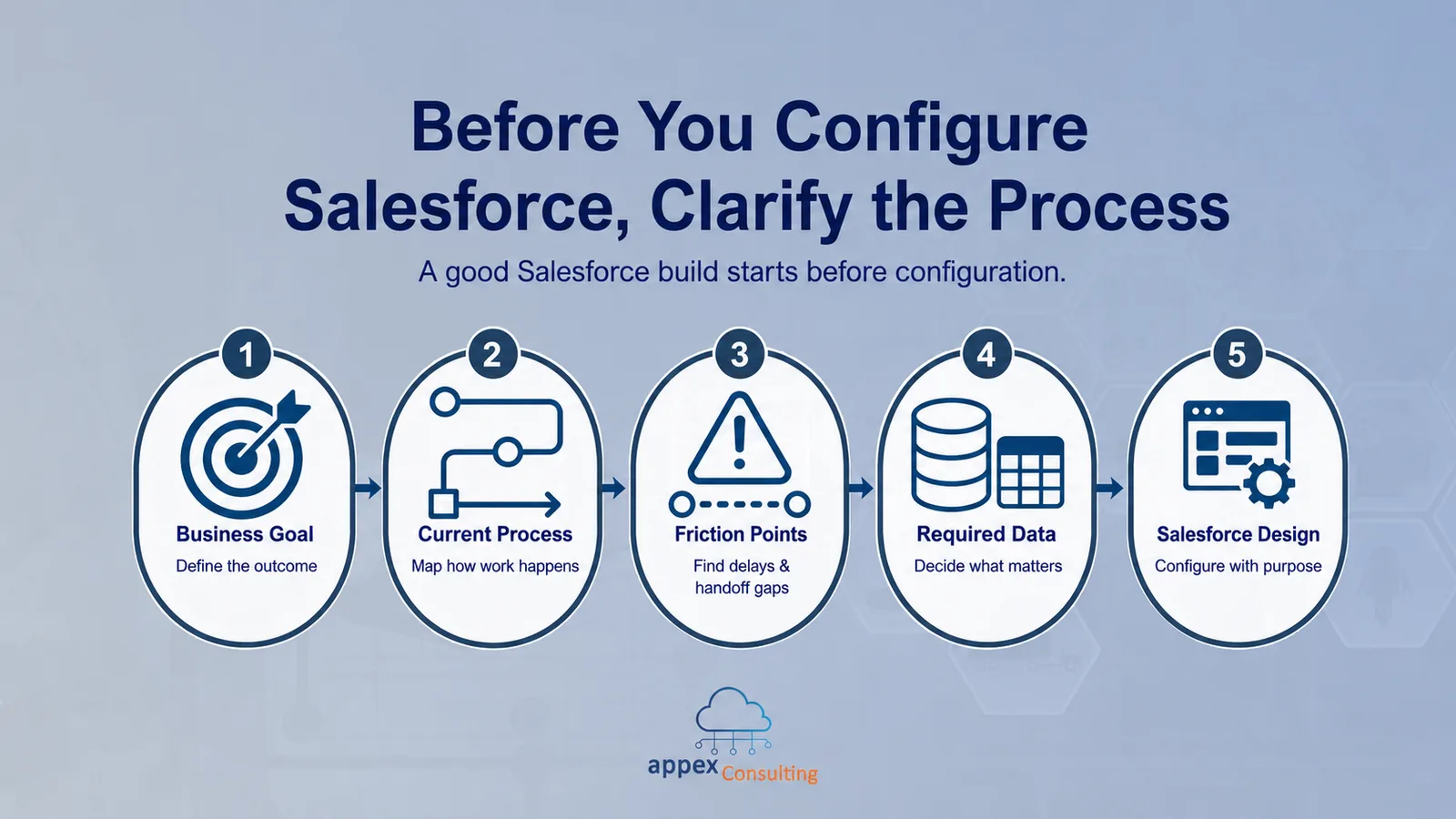
This is why process design has to come before configuration.
A common implementation failure starts with a simple sentence: “Let’s just build what the team does today.”
Sometimes that is the right move. But often, what the team does today is already full of workarounds. People copy data from one system to another. Managers ask for updates in meetings because the dashboard cannot be trusted. Sales reps keep their own notes outside the CRM.
If you automate that exactly as it is, you may only make the problem faster.
Before building, teams should ask what the process is meant to achieve, where delays happen, which handoffs are unclear, what information is required at each stage, and who will own the process after go-live.
Salesforce implementation is not just a chance to digitalize existing work. It is a chance to simplify it.
User adoption was treated as training, not behavior change
Most companies understand that users need training. Fewer understand that training and adoption are not the same thing.
Training teaches people where to click. Adoption means people actually use the system as part of their daily work.
That difference is where many Salesforce implementations struggle. A team might receive a walkthrough before launch, attend a few sessions, and get access to a user guide. On paper, the training box is checked. In reality, users go back to their desks and face the same pressure they had before: hit targets, respond to customers, close deals, resolve issues and move quickly.
If Salesforce feels like extra admin, they will avoid it.
This is especially true when the system asks users to enter information without giving them anything useful in return. A sales rep is more likely to update Salesforce if it helps them prioritise follow-ups, understand account history or reduce manual reporting. A service agent is more likely to trust Salesforce if it gives them the full customer context and clear next steps.
Adoption improves when Salesforce becomes useful to the person using it, not just to the person reporting on it.
That means implementation teams need to involve users early. Not only executives. Not only department heads. The people who will live inside the system every day.
Ask them what slows them down. Watch how they currently work. Identify where Salesforce can remove friction. Show them how their input changed the final design. Keep training practical, short and ongoing.
Salesforce adoption is not a launch event. It is a behavior change program.
Bad data quietly destroys trust
Bad data is one of the fastest ways to make Salesforce feel useless.
At first, it looks like a reporting problem. A dashboard does not match what the sales manager expected. The forecast seems too optimistic. A customer record has missing fields. A duplicate account appears. A marketing segment includes the wrong contacts.
Then the problem spreads.
If users do not trust the data, they stop trusting the reports. If they do not trust the reports, they keep their own spreadsheets. If they keep their own spreadsheets, Salesforce becomes less complete. The less complete Salesforce becomes, the less useful it is for everyone else.
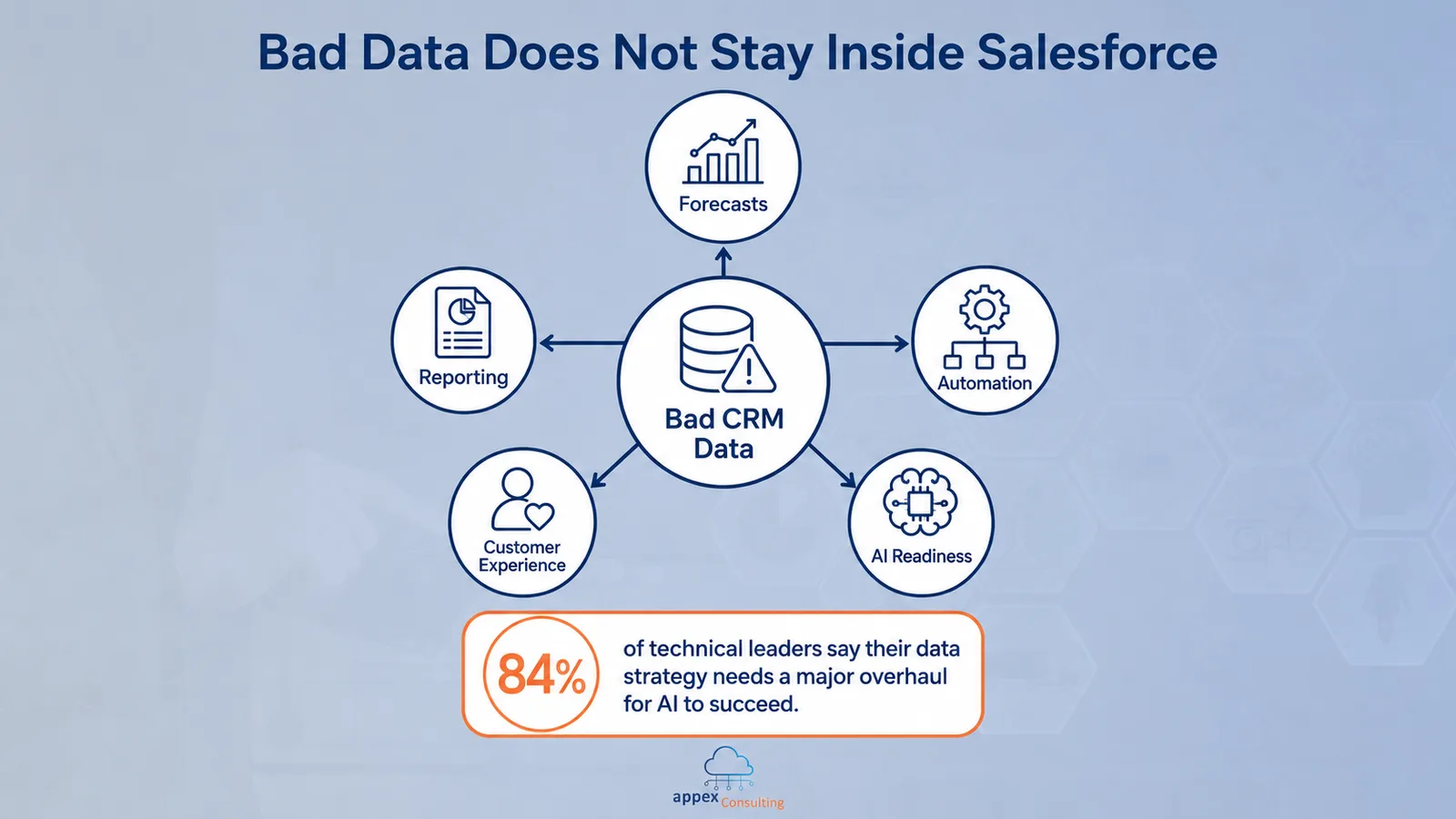
Bad data also affects automation. A flow is only as reliable as the data it depends on. If industry, region, product interest, account ownership or customer status are wrong, automation can route work incorrectly, trigger the wrong communication or create unnecessary manual clean-up.
And now, with AI becoming part of the Salesforce ecosystem, data quality matters even more.
AI tools and agents need trusted, unified and contextual data to create useful outputs. If customer data is scattered, incomplete or outdated, AI will not fix the problem. It may simply make poor information easier to act on.
Salesforce’s Data and Analytics Trends research makes this point clearly: 84% of data and analytics leaders say their data strategies need major overhauls to make AI work.
This is why data quality should not be treated as a clean-up task for later. It should be part of the implementation from the start.
Before migration, teams should decide which data is truly needed, where it will come from, how it should be structured, which fields are mandatory, what validation rules are required, and who will maintain standards over time.
Good CRM data is not about collecting everything. It is about collecting the information that helps people make better decisions.
Over-customisation created more complexity than value
Salesforce is flexible. That is one of its biggest strengths.
It is also one of the easiest ways to create problems.
A new field sounds harmless. A new automation sounds helpful. A new approval step sounds reasonable. A new dashboard sounds useful. Each request may make sense in isolation. But over time, small changes can build into a system that feels heavy, fragile and difficult to use.
This usually happens when teams confuse “possible” with “valuable”.
Just because Salesforce can be customized does not mean every request should be built. A successful org is not the one with the most fields, flows, dashboards, record types or page layouts. It is the one where every component has a clear business purpose.
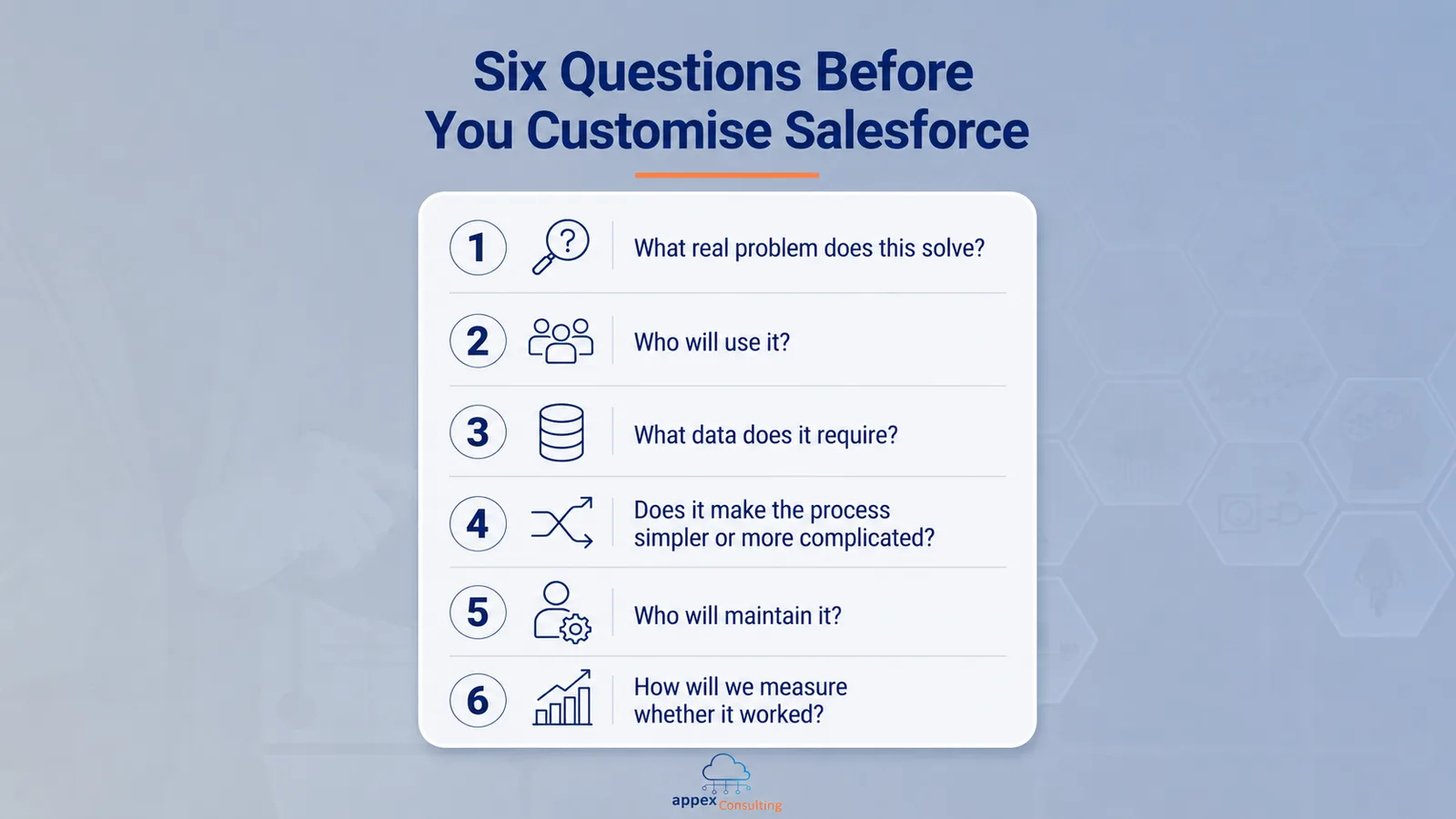
These questions matter because every customisation creates a future responsibility. Someone has to test it. Someone has to explain it. Someone has to update it when the business changes.
This becomes even more important when a company uses multiple Salesforce products. Agentforce Sales, Agentforce Service, Agentforce Marketing, Field Service and Operations, Data 360, Slack and Agentforce can all create value. But if they are implemented in disconnected ways, the business ends up with more tools, more handoffs and more confusion.
The goal is not to use every Salesforce capability at once. The goal is to build the right capability at the right time, in a way that supports the wider business model.
Go-Live was treated as the finish line
Go-live often feels like the end of the project. The system is built, users have access, data has been migrated and training has happened.
But in reality, go-live is the moment the real test begins.
That is when users start interacting with Salesforce under real pressure. Edge cases appear. Missing data becomes obvious. Reports are challenged in management meetings. Teams realise that one process works well, while another still needs adjustment.
This is not failure. This is normal.
The issue is when businesses have no plan for what happens next. Salesforce itself changes constantly. New releases introduce new features, AI capabilities evolve, business teams change their processes and leaders ask for new visibility. A Salesforce implementation should not freeze the business in place. It should create a platform that can evolve with it.
That does not mean every company needs a large internal Salesforce team. But it does mean someone needs to own the system after go-live, collecting feedback, prioritising improvements, supporting users, reviewing automations, protecting data quality and connecting technical changes to business outcomes.
For many companies, this is where ongoing Salesforce support becomes important. The Appex Salesforce Managed Services offering helps close the gap between “the system is live” and “the system keeps creating value”. Instead of letting Salesforce slowly drift away from the way the business works, managed support gives companies a way to keep improving the platform without building a full internal team.
What to do instead
So, how do you avoid the common Salesforce implementation trap?
Start by changing the question. Instead of asking, “How do we set up Salesforce?”, ask, “How should our business work once Salesforce is in place?”
That shift changes the entire implementation.
First, start with business outcomes, not features. Define what the system should improve: faster lead response, more accurate forecasting, better service visibility, cleaner segmentation, stronger field coordination or fewer manual steps.
Second, map the real process before building. Document how work happens today, where delays appear, which handoffs are unclear and what should change before Salesforce is configured.
Third, involve users early. The people who will work inside the system every day should help shape it. Their input makes the final design more practical and easier to adopt.
Fourth, treat data as a design decision. Decide which fields matter, what “complete” means, how duplicates will be prevented and who owns data quality after launch.
Finally, customize with restraint. Every field, flow, dashboard or approval step should solve a real business problem. If it adds complexity without creating value, it probably does not belong in the first version.
A good Salesforce implementation is not about building everything the platform can do. It is about building the right foundation, in the right order, so the business can keep improving after go-live.
Salesforce does not fail in isolation
When a Salesforce implementation disappoints, it is tempting to blame the platform.
But usually, the issue is not Salesforce itself. The issue is the operating model around it.
The process was not clear enough. Users were not brought along properly. Data quality was underestimated. Customisation happened without enough discipline. Ownership after go-live was unclear. The system was treated as an IT project rather than a business capability.
The good news is that these problems are fixable.
Salesforce is at its best when it becomes the place where teams actually work, not just the place where they report what already happened somewhere else. It should help sales teams focus, service teams respond faster, marketing teams segment smarter, field teams coordinate better, leaders make decisions with confidence, and AI tools work from trusted data.
That does not happen by accident. It happens when Salesforce is designed, adopted and continuously improved around the way the business creates value.
If your Salesforce setup feels heavier than expected, the platform may not be the problem. It may simply be time to review the process, data, adoption and ownership around it.
At Appex, we help companies implement, optimize and expand Salesforce across the Salesforce platform. If you want to understand whether your Salesforce org is supporting growth or slowing it down, we can help you identify what to fix first.