
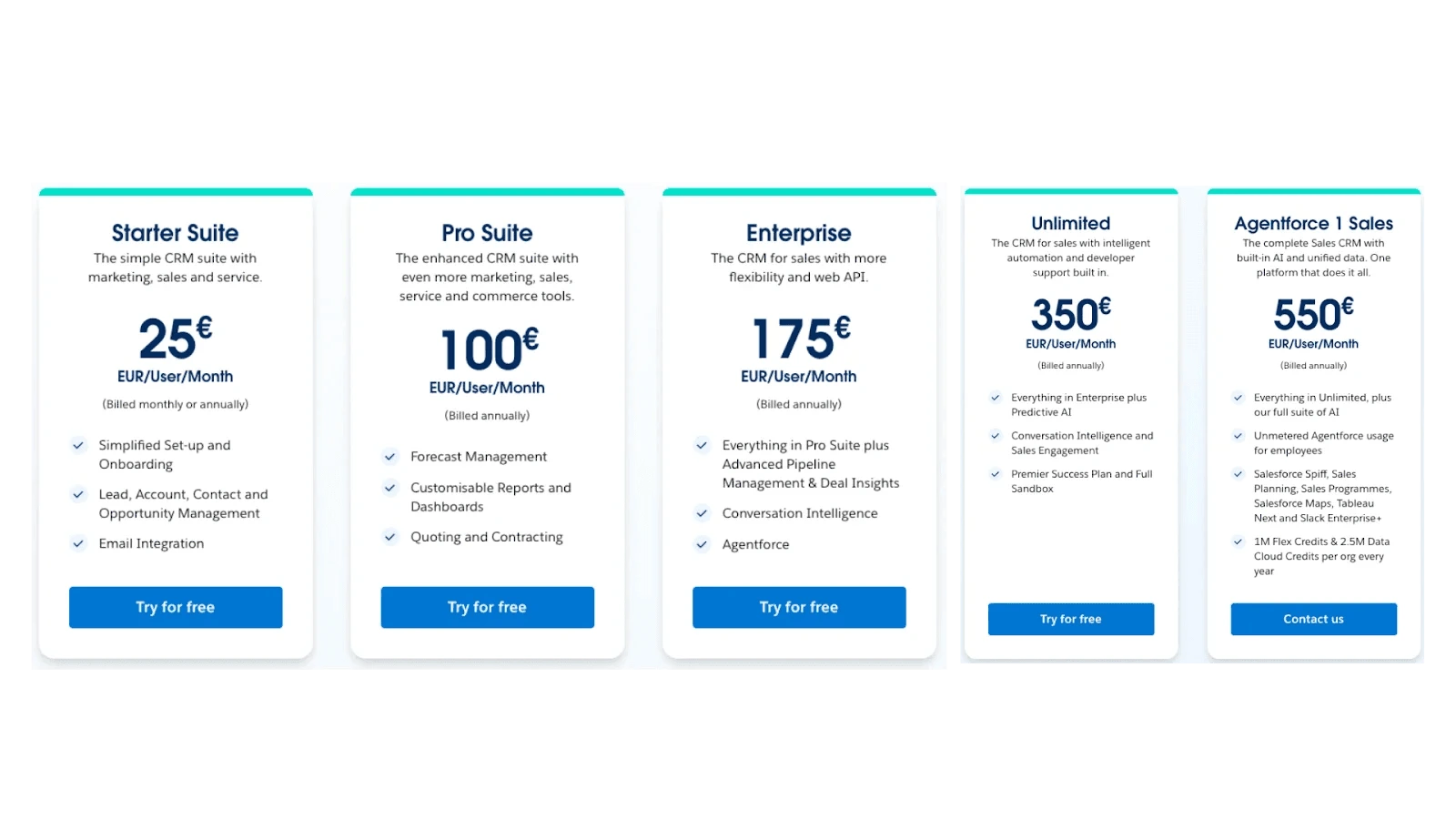
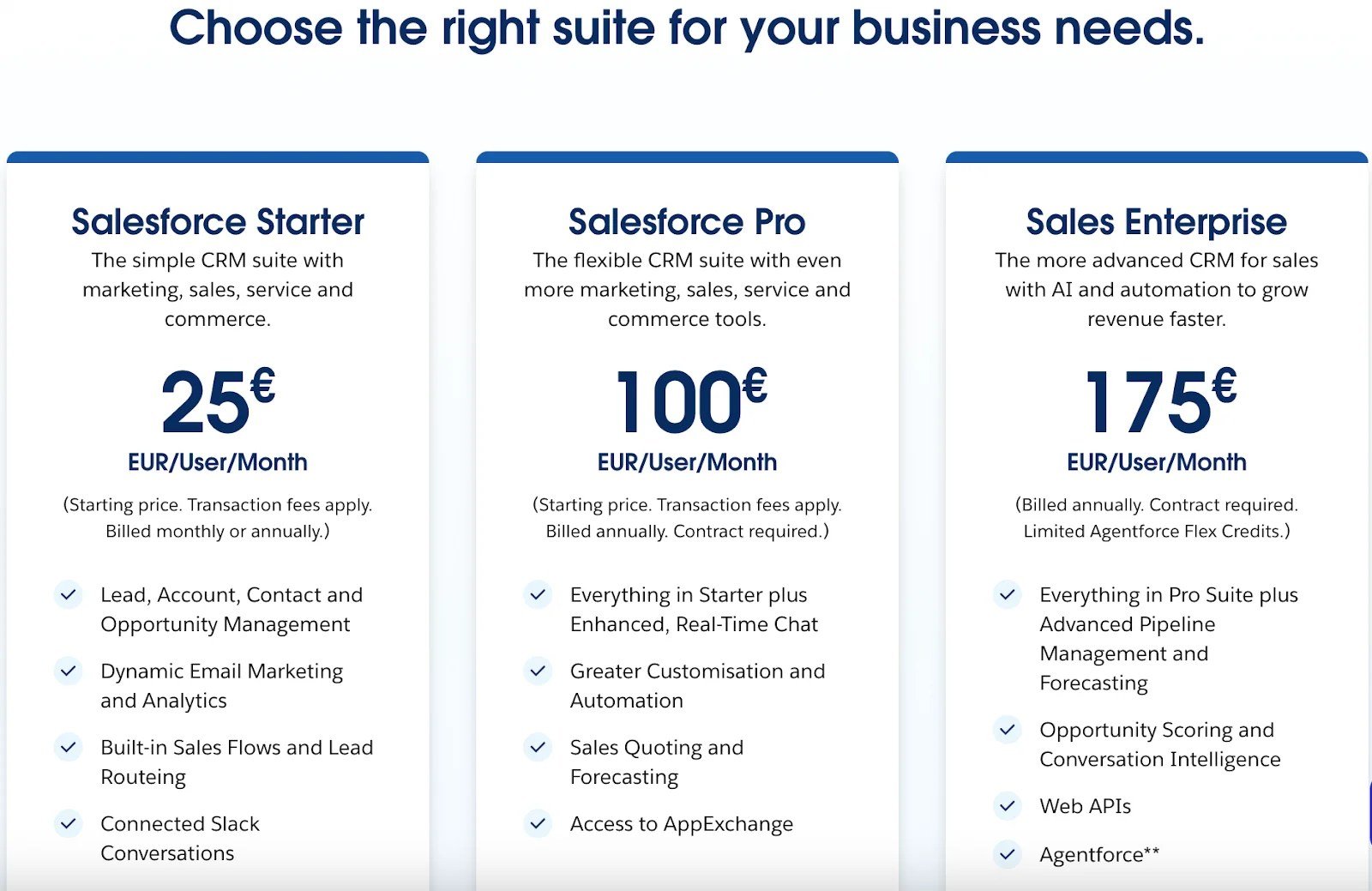
Most small business owners first encounter Salesforce costs through its pricing page. The numbers seem simple enough. You can see the cost per user, per month or the price for specific feature sets. There are different ‘suites’ available for small businesses. But those figures don’t show what it actually takes to get Salesforce up and running inside your business.
Salesforce doesn’t behave like typical software tools that you just download and start using. There is an entire community behind it (learn more about the ecosystem). It is a highly flexible, enterprise-grade platform that lets you model your business inside it, if you know how to configure it properly.
That flexibility is its greatest strength, and possibly its biggest trap. Without understanding how Salesforce is structured, it’s easy to underestimate the total cost of ownership. Licensing is only one layer. Implementation, configuration, integrations, and long-term maintenance all carry their own price tags and they rarely appear in the sales pitch.
We see this happen all the time. We wrote this article because we help small businesses evaluate, implement, and manage Salesforce every day. Our goal is to help you make informed decisions and avoid paying for things you don’t need.
By the end, you’ll have a realistic view of what Salesforce might actually cost you to run, some examples of quickstart implementation packages and a clearer sense of how to approach it strategically rather than reactively.
How Salesforce works and why it’s priced the way it is
A good way to picture Salesforce is like renting an apartment in a managed building. You don’t have to worry about the plumbing, or the roof. You just move in, furnish it the way you like, and start living. Salesforce is the building, and you’re the tenant.
This model has a few upsides, especially for small businesses. You don’t need to buy or maintain servers, and you don’t need an in-house IT team to keep things running.
However, the pricing can be a little confusing. For example, Sales Cloud is priced on a per user, per month basis. Whereas, Marketing Cloud is typically priced by edition and the capabilities you need, with some components priced based on usage, and Agentforce is based on consumption. Also, the more complex the functionality you need, the higher the edition you’ll need to choose.
While the core platform is priced clearly, new customers are often caught off guard by the hidden costs, things that aren’t spelled out on the pricing page. Salesforce is powerful, but it’s not plug-and-play. To turn it into something genuinely useful for your business, it must be set up accordingly. That might mean hiring a consultant, paying for an implementation partner, or investing internal time and effort into configuration and onboarding.
What does it cost to evaluate Salesforce?
Technically, evaluating Salesforce is free. You can go to the website, click through pricing pages, watch some videos, and even start a 30-day trial without paying anything.
But if you want to do it properly, and understand how it would actually work for your business, there’s still a time investment. You’ll need to sit through product demos, have discovery calls with AEs (Account Executives), and maybe request a tailored proof of concept or sandbox demo that reflects your use case.
If you’re unfamiliar with how Salesforce is structured, even asking the right questions can be hard. Most small businesses aren’t simply evaluating Salesforce, they’re learning how Salesforce would work for them.
The amount of time this phase will take depends on your urgency and who’s available internally to lead the conversations. You’ll need someone technical enough, but also someone business minded, to ask the right questions, and understand the answers.
This is also where early support can make a big difference. If you already know you’ll need help, working with a Salesforce consultant or implementation partner at this stage can save you time and steer you away from over-buying features you won’t use.
By the end of this phase, you should have a clearer picture of:
- What your team actually needs from Salesforce.
- Whether Salesforce is a good fit at all.
- And if it is, what kind of edition and feature set you’re realistically going to need to begin with.
How much will it cost small businesses to implement Salesforce in 2026?
There’s no one-size-fits-all price tag. It’s like asking “How much does it cost to build a house?” The cost to implement Salesforce depends on what you’re building and how far you want to go from day one. It’s influenced by a handful of practical choices:
- How complex your business processes are
- How much legacy data you’re bringing in (and how clean it is)
- How much you want to automate upfront
- Who’s doing the implementation (internal team, freelancer, specialist partner)
- How fast you want to go live
- Whether you’re happy with an MVP-style setup or want everything fully configured from the start
Your consultant should be able to walk you through some ballpark examples. For instance: a business with 50 employees, a simple quoting process, 10 automations, and clean legacy data would be a very different price than if you’re layering in multiple Salesforce Clouds with 100s of users, external integrations, or advanced workflows.
Real Salesforce implementation packages
We’ve covered the licensing cost, but a significant cost of choosing Salesforce is the implementation. We work with small business Salesforce customers day in and day out, and due to that, we’ve been able to create “Kickstart” packages. These are purpose-built for companies who want to get up and running fast, without over-investing.
Each package assumes:
- No custom build
- No third-party integrations (e.g. ERP, billing systems)
- No additional Salesforce Clouds in scope
- Clean, organised data ready to import
- Active Salesforce licenses already in place
All projects begin within two weeks of agreement and follow a 10–15 working day delivery window.
Agentforce Sales (formerly Sales Cloud) Kickstart
- Setup of core Sales Cloud objects (Leads, Accounts, Contacts, Opportunities, Activities)
- One quote format and one pricebook
- Gmail or Outlook email integration
- Web-to-Lead form setup
- Historical data import (Accounts, Contacts, Opportunities)
- Duplicate rules to prevent double entries
- Five reports and one dashboard
- Four hours of user training and four hours of admin training
Agentforce Kickstart
- Setup of one Agent type (internal or external, e.g. sales coach or service agent)
- Configuration of GenAI for Salesforce and standard topics
- One custom action included
- Flows and Omni-Channel routing setup
- Einstein trust layer and data integrity configuration
- Agent testing and validation
- Two reports and one dashboard
- Four hours training for users and four for admin
The Appex project methodology
Appex delivers every project through a three-stage approach designed for speed and clarity:
- Plan & Design – requirements gathering, prioritisation, and solution design
- Build – sprint-based development, demos, and feedback loops
- Test & Train – testing, user training, and final delivery
After Go-Live, clients can continue with Project Warranty, Follow-Up Phases, or Managed Services for ongoing support and optimisation.
Not sure where you fit?
These packages aren’t designed to cover every use case, but they’re a solid reference point. If you’re looking for something more complex like custom objects, ERP integrations, or advanced automations you’ll want a more tailored quote. But if your needs are straightforward, these are real numbers you can budget around.
How much will it cost to maintain Salesforce?
After your Salesforce environment is live, you still need to look after it. Your users will need support, processes will change. You’ll want to improve automation, build new dashboards, update record types, lightning pages, add new components and install managed packages, and eventually make tweaks you probably didn’t think about during implementation.
Some businesses try to handle all this in-house, while others outsource to a partner. What makes the most sense for you depends on how complex your setup is, how often you want to make changes, and whether you have internal Salesforce expertise.
In-house admin vs. external support
Hiring a full-time admin is the most direct way to keep things running. You’ll have someone on hand who knows your Org, can make changes quickly, and support your team as needed. But that comes with a fixed cost — experienced admins will cost you around €75,000 in salary alone, before adding on benefits, onboarding, and management overhead. For small businesses, that’s often overkill.
That’s why many choose to outsource instead. If you’re not constantly changing your Salesforce setup, paying a full-time admin to sit around isn’t efficient. And if your internal team isn’t technical enough to manage changes properly, every small task can turn into a bottleneck, decreasing the ROI on your Salesforce investment.
Salesforce Managed Services: a practical middle ground
For small businesses that want access to Salesforce expertise without hiring full-time, Managed Services tends to be the best fit. It gives you consistent access to a team of flexible experts on a subscription-style basis. You buy a set number of hours per month, and use them however you need, from user management to automation, reporting, troubleshooting, and more.
It’s lower risk. You only pay for what you use and you don’t have to worry about training, upskilling, or retaining in-house talent. Look for a partner that has worked with companies similar to yours.
Appex Salesforce Managed Services
If your business is already running Salesforce but lacks the resources to maintain it properly, Appex can take care of the backend for you. Our Managed Services offering is built for small to mid-sized businesses who need expert Salesforce support, without the commitment of a full-time hire. What’s included:
- User management
- Creating or editing processes
- Building automations and flows
- Enabling new Salesforce features
- Handling enhancements and configuration updates
- Troubleshooting issues or bugs
- Maintaining clean data and permission sets
- Creating new reports or dashboards
- Custom development
- Additional training for users & admins
It’s a good fit if you don’t have a full-time Salesforce resource, your team is too busy (or not technical enough) to handle backend admin, you want Salesforce to keep evolving with your business, or you’re struggling to keep up with small fixes or improvements.
Our advice when buying Salesforce
It’s clear that there’s a lot to consider when it comes to your Salesforce investment, and we understand it can feel overwhelming. As we mentioned, the platform is flexible, but that flexibility means there’s a lot to understand up front. The goal isn’t to buy as little as possible, but to make sure what you buy lines up with how you’ll actually use Salesforce in the first few months.
Start with what you’re confident you’ll use
Salesforce AEs want you to succeed, and they’ll naturally showcase what’s possible with the platform. It’s your job to come into the conversation with a clear picture of what your team needs right now. You can always add licenses, upgrade editions, or grow into new features later.
You will want to avoid committing to future scenarios that you haven’t fully defined yet. For example, buying 50 licenses for a 25-person team because the per-user price is attractive sounds efficient… until those extra seats sit untouched for a year. It’s usually safer to commit to confirmed headcount and short-term growth (3–6 months).
We are proud of our close working relationship with Salesforce and we’ve found it to be beneficial for our customers. Faidon, our founder, actually worked as an AE at Salesforce, seeing firsthand how often companies struggled because the buying and implementation journey is difficult to get right. That experience led to the founding of Appex, to make things simpler and faster for businesses of any size.
Get clarity on what you’re seeing in the demo
Salesforce demos are designed to show the potential of the platform and the ecosystem around it. Sometimes the features shown are native, but they may require specific editions, add-ons, or AppExchange tools. That isn’t a problem. It just means you need to know what’s what. Ask your AE or Solution Engineer to break down:
- Which features are included in the edition you’re being quoted?
- Which elements in the demo require add-on licenses?
- Which parts rely on apps or integrations from partners?
- Whether certain features depend on other Salesforce products.
Final thoughts
Salesforce is a big investment. And while you don’t need to be an expert, you do need to come into the process with your eyes open.
If this is your first time buying or implementing a CRM, don’t rush it. Ask lots of questions. Ask for real examples. Ask your Account Executive to show you a customer like you — same industry, similar team size, similar use case.
If you’re feeling unsure at any point, get someone on your side early. A good implementation partner will help you navigate pricing and technical scope, but also push back on anything you don’t need right now. That independent guidance can easily save you money across the life of your Salesforce contract.
Whether you work with us or not, the takeaway is this: take your time, push for clarity, don’t be afraid to say “no” or “not yet” — and if you need a second opinion, get one. It’s cheaper than learning the hard way.