

For many businesses, Salesforce is still the place teams log into when they need to manage customers. Sales teams update opportunities. Service teams work on cases. Managers check dashboards. Admins configure fields, flows, permissions and reports.
That way of working is still important. The Salesforce interface is not going away. But the reality around it has changed. Work now happens across email, Slack, Microsoft Teams, portals, mobile apps, ERP systems, support channels and, increasingly, AI agents. This is where Salesforce Headless 360 becomes relevant.
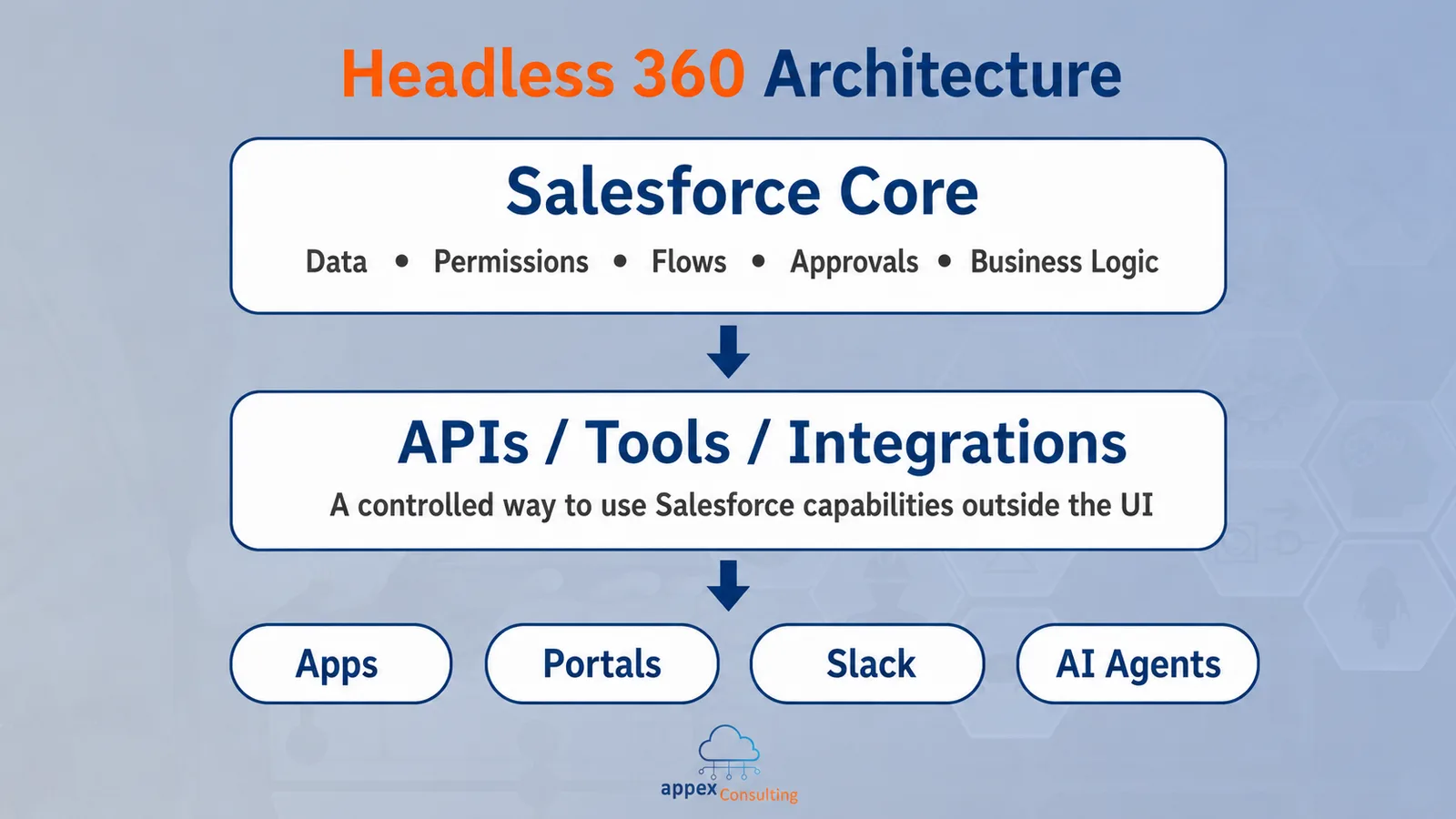
Salesforce describes Headless 360 as a way to make Salesforce capabilities available beyond the browser. Data, actions, automations and business logic can be accessed through APIs, tools and commands, so Salesforce can support work in the systems where users already spend their time.
That point matters because Headless 360 can easily be misunderstood. It is not a product setting that a company simply enables in Setup. It is closer to an architectural direction: Salesforce remains the trusted platform in the background, while other apps, portals, workflows or agents can use its capabilities in a controlled way.
Salesforce Is Moving Beyond The Browser
Most CRM adoption problems are not caused by users refusing to use Salesforce. They are usually caused by friction.
A sales rep preparing for a call may need account context, open opportunities, recent cases and next steps. A service rep may need case history, entitlement information and relevant knowledge articles. An operations team may need Salesforce to connect with finance, fulfillment or ERP workflows.
When every task requires users to stop what they are doing and open another system, Salesforce can start to feel like extra admin work.
Headless 360 points to a different model. Salesforce can still be the system of record, but the interaction does not always need to happen inside the Salesforce UI. A user could access Salesforce information from Slack. A customer could complete a request through a portal. A custom application could trigger a Salesforce process in the background. An AI agent could retrieve information or call an approved action without clicking through screens like a human user.
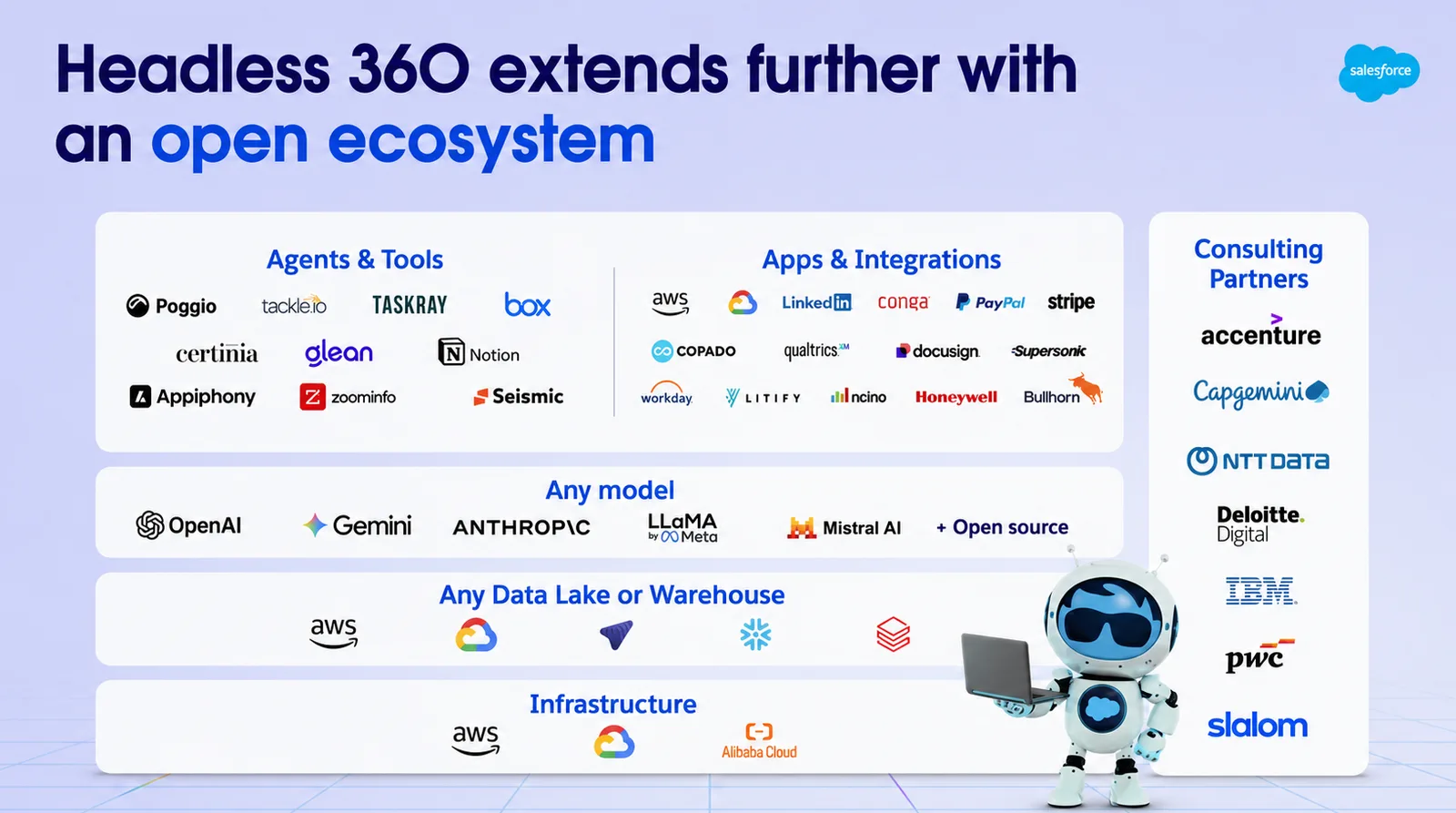
This is also connected to the broader Salesforce ecosystem. Salesforce is no longer just one CRM screen. It includes sales, service, marketing, analytics, collaboration, data, integration and AI capabilities that can support multiple parts of a business. Headless 360 extends that idea by making those capabilities easier to use across more channels.
What “Headless” Actually Means
The word “headless” can sound more technical than it needs to. The “head” is the front-end experience: the screen, app or interface the user sees. In a traditional Salesforce setup, that front end is usually the Salesforce UI. A user logs in, opens an account, updates an opportunity, checks a case, launches a flow or submits a record for approval. In a headless setup, the front end can be something else. It could be a customer portal, a mobile app, Slack, Microsoft Teams, a custom website or an AI agent.
The important part is what remains behind the scenes. Salesforce still holds the data, rules, permissions, workflows and business logic. The difference is that those capabilities can be used from outside the standard Salesforce screen.
For example, a customer portal might update a request and trigger the right Salesforce process in the background. A sales workflow in Slack might surface account context before a meeting. An AI agent might call an approved Salesforce action, follow the right permissions and trigger the correct workflow.
This is why Headless 360 should not be reduced to “APIs only.” A database can tell you that an account exists. Salesforce can also tell you who owns it, which opportunities are open, whether there are active cases, what approval rules apply and what should happen next. That combination of data, process and governance is the real value.
Why This Matters Across The Company
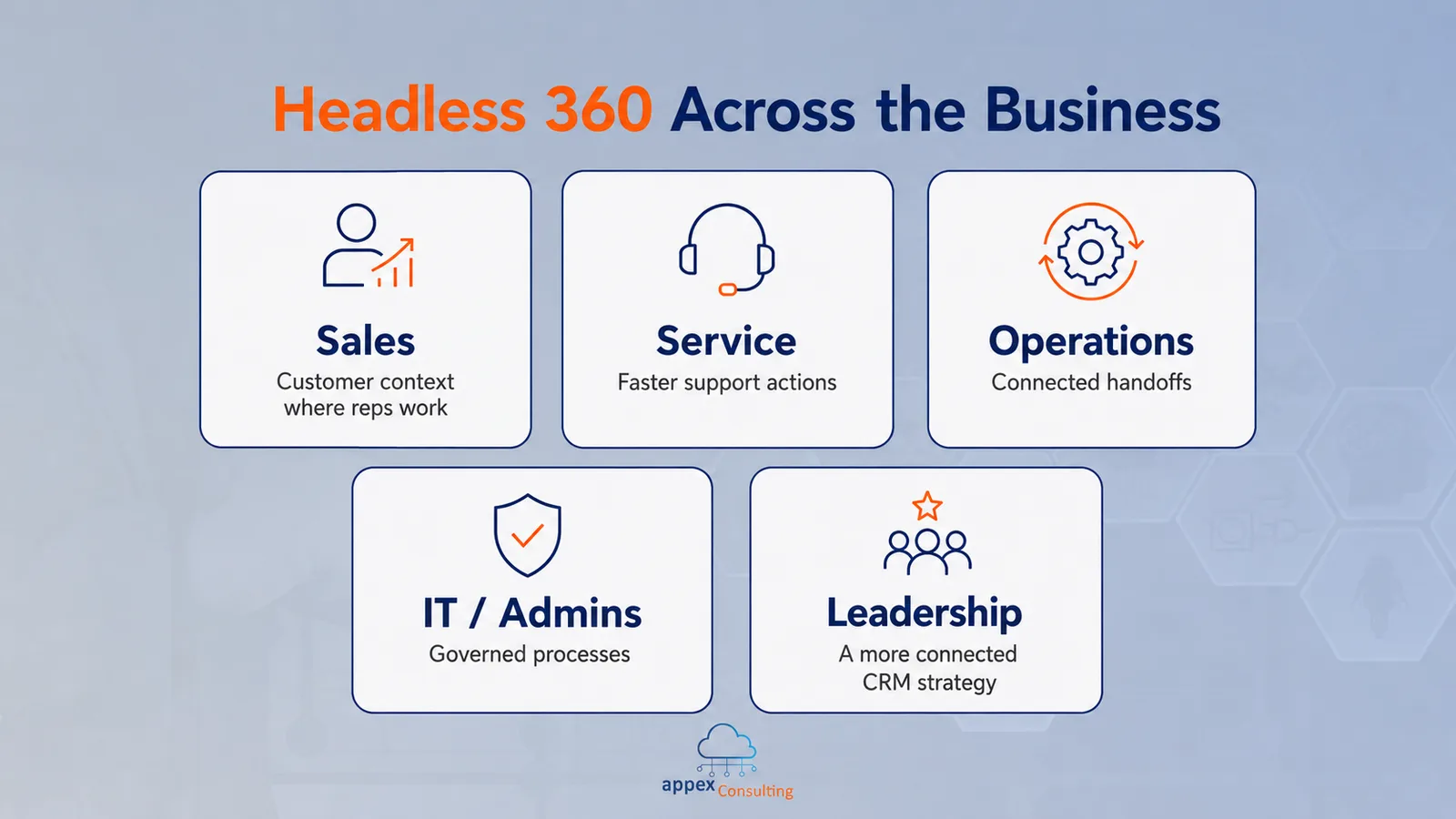
Headless 360 should not be treated as a developer-only topic. It affects how different teams interact with Salesforce:
Sales teams can reduce context switching. Reps can access customer context, next steps and open risks where they are already working, instead of opening several Salesforce tabs before every call.
Service teams can respond faster. Case history, entitlement information, knowledge articles and recommended actions can be brought closer to the customer conversation.
Operations teams can improve handoffs. Salesforce processes can connect more naturally with ERP, finance, fulfilment or internal approval systems.
IT and Salesforce admins gain a new responsibility. If Salesforce capabilities are used across more tools, then permissions, automations and data quality need to be designed carefully.
Leadership teams get a more connected CRM strategy. Salesforce becomes less of a system that only stores activity and more of a platform that supports how the business operates.
The business question is whether the processes inside Salesforce are clear and reliable enough to be used across more channels. That question is closely connected to Salesforce implementation. A strong implementation is not only about configuring fields and screens. It is about designing the operating model, data structure, permissions, integrations and user experience that the business will depend on later. Headless 360 makes that foundation more visible.
AI Makes The Foundation More Important
AI agents make this shift more urgent. A human user can read a page layout, notice missing information and ask a colleague when something is unclear. An AI agent needs more structure. It needs trusted data, clear instructions, reliable permissions and approved actions.
If account data is duplicated, an agent may use the wrong customer context. If permissions are too broad, risk increases. If automations are fragile, more channels can trigger more failures. If a process depends on undocumented manual steps, exposing it through an app or agent will not make it more reliable.
This is one of the practical lessons behind AI readiness. Buying or enabling an AI product is only part of the work. The platform underneath it needs to be ready.
Salesforce’s Headless 360 Trailhead module explains that Salesforce data, workflows and actions can be surfaced in environments such as Slack, Microsoft Teams, WhatsApp or AI agents. That can be powerful, but only when the underlying Salesforce setup is trustworthy.
For businesses preparing for Agentforce or other AI-enabled workflows, Headless 360 is a reminder that architecture and governance still matter. Clean data, clear processes and secure actions become more important, not less.
The Opportunity: Make Salesforce Easier To Use
One of the biggest opportunities with Headless 360 is adoption. Many companies struggle to get full value from Salesforce because users update the system after the real work has already happened somewhere else. The CRM becomes a reporting layer instead of part of the workflow.
Headless experiences can reduce that gap. If Salesforce information and actions appear inside the tools teams already use, the platform becomes easier to adopt. Users still benefit from Salesforce data and processes, but they do not always need to stop and switch systems.
This does not mean every company should expose every Salesforce process immediately. The value comes from choosing the right use cases. A well-designed Salesforce org can use headless capabilities to make work faster and more connected. A messy org will struggle, even if the technology is available. That is where Salesforce consulting becomes useful. Businesses need to decide which capabilities should be exposed, which should stay controlled and how Salesforce should fit into the wider operating model.
The goal is not to use every new Salesforce capability as soon as it appears. It is to find where Salesforce can reduce friction, improve visibility and support the way teams already work.
The Risk: Exposing Weak Processes
When Salesforce is used mainly through the UI, some problems can stay hidden for a while. Users may know which fields to ignore. A manager may manually check important updates. An admin may quietly fix failed processes. Different teams may rely on workarounds that never became official. Those weak points become harder to hide when Salesforce capabilities are exposed through APIs, apps or agents.
A field that is unclear to users will also be unclear to an integration. A process that depends on informal knowledge will not scale across channels. A missing validation rule will not protect the business just because the action happens somewhere outside the Salesforce UI.
Before connecting more tools to Salesforce, companies should review whether the process is ready. This includes ownership, permissions, automation quality, exception handling and reporting.
If the current Salesforce org already feels heavy, inconsistent or difficult to trust, the business may need Salesforce org optimization before it is ready for more advanced headless, integration or AI use cases.
How To Prepare Your Salesforce Org
Preparing for Headless 360 does not mean rebuilding everything. It means strengthening the parts of Salesforce that future experiences will depend on.
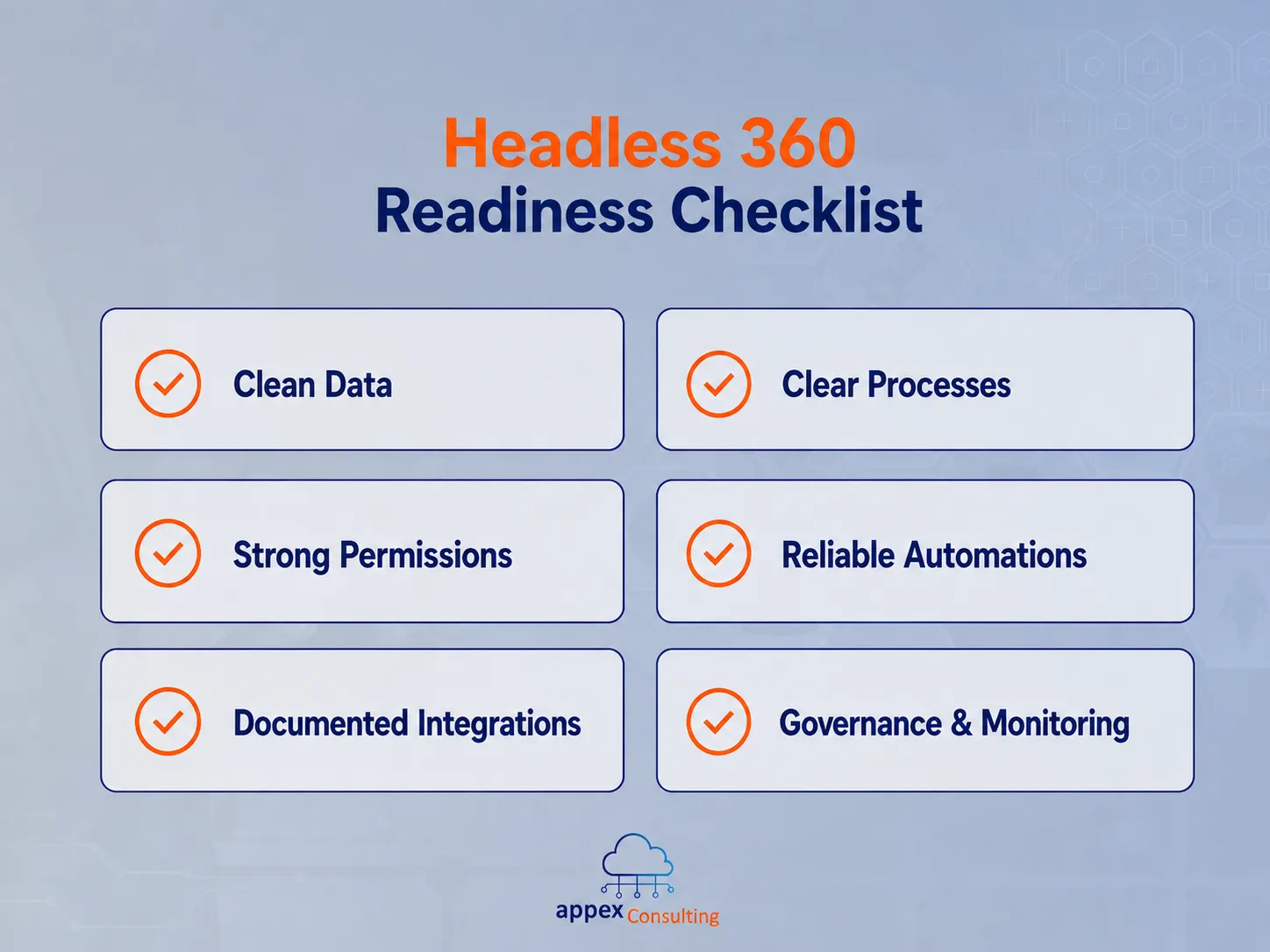
Start with data quality. Accounts, contacts, opportunities, cases and custom objects should be clean, consistent and clearly owned. If teams do not trust the data today, integrations and agents will not fix that tomorrow.
Review core processes next. Important actions such as lead routing, quote approvals, case escalation, renewal follow-up and customer onboarding should be clearly defined. If a business rule matters, it should not live only in someone’s memory.
Permissions and governance also need attention. Page layouts are not enough. Field-level security, sharing rules, permission sets, validation rules and approval processes need to reflect how the business actually works.
Automations should be understandable and maintainable. Flows and integrations that only one person understands can become risky when they are triggered by more channels.
Ownership is the final piece. Headless and AI-enabled experiences are not only IT projects. The business must own the process, and Salesforce teams must own the platform design that supports it.
Salesforce’s own CRM implementation guidance starts with understanding business goals and gathering requirements across stakeholders. The same discipline applies here. Before exposing Salesforce capabilities across new channels, businesses should be clear on what the process should achieve, who owns it and how success will be measured.
How Appex Can Help You Get Started
Headless 360 is about using Salesforce capabilities beyond the standard UI without losing control of data, permissions, automations and business logic. The setup matters because these capabilities may now be used from portals, apps, integrations or agents, not only by users inside Salesforce.
At Appex, we help businesses design Salesforce architectures that are ready for connected experiences. This can include customer portals, internal apps, integrations, Slack-based workflows, external systems and, where relevant, AI agents that need to interact with Salesforce safely.
Our role is to help define what should be exposed, what should stay controlled and how each process should run securely across channels. That usually starts with a review of the current Salesforce setup, the business process, data quality, permissions, integrations and automation design.
For businesses exploring Headless 360, a focused starting package is often the most practical path. The first step can be one clear use case: assess the Salesforce foundation, define the required data and actions, design a safe first version and create a roadmap for expansion.
This approach helps avoid the mistake of connecting more tools to a process that is not ready. Instead, Salesforce becomes a trusted platform that can support work across apps, portals, integrations and future AI-enabled workflows.
Whether the next step is Salesforce implementation, org optimization, integrations, automation design or a Headless 360 readiness review, Appex can help turn the idea into a controlled roadmap.
Salesforce is moving beyond the browser. The question is whether your business is ready to move with it.