

AI agents are showing up in almost every Salesforce conversation right now. For small and mid-sized businesses, that can be useful, but also overwhelming. Salesforce now talks about Agentforce, ready agents, actions, topics, instructions, data grounding, testing and deployment. The demos look polished, but the practical starting point is usually much smaller than the demo.
Most teams get more value from their first agent when they start with a narrow task: something repetitive, easy to test and safe enough to keep under human review. For this walkthrough, we’ll use a simple example: an internal support case assistant. The agent helps a service rep review a customer case, understand the context, suggest a next step and recommend escalation when needed.
The setup can look slightly different from one Salesforce environment to another, but the first build usually follows the same pattern, start with a focused use case, define the agent’s job, add the right instructions, connect the right data and actions, test carefully, and roll out to a small group first.
Start With A Use Case You Can Actually Test
A first agent should be easy to explain in one sentence. For this example, the agent helps service reps review support cases and decide what to do next. Customer Service is a good first use case because the work often depends on structured information already in Salesforce, such as cases, accounts, contacts, previous case history, knowledge articles, entitlements and escalation rules. A rep may spend several minutes checking records before responding to a customer. An agent can help pull that context together and draft a suggested response for the rep to review.
The first version should stay narrow. It can summarize the customer issue, check relevant case and account context, suggest a response, recommend escalation and explain when information is missing. Higher-risk actions, such as closing cases automatically, issuing credits, changing contracts or sending customer-facing emails, should usually stay out of the first version. That scope is not exciting in a demo, but it is easier to test and easier for users to trust.
Ready Agents Give You A Starting Point
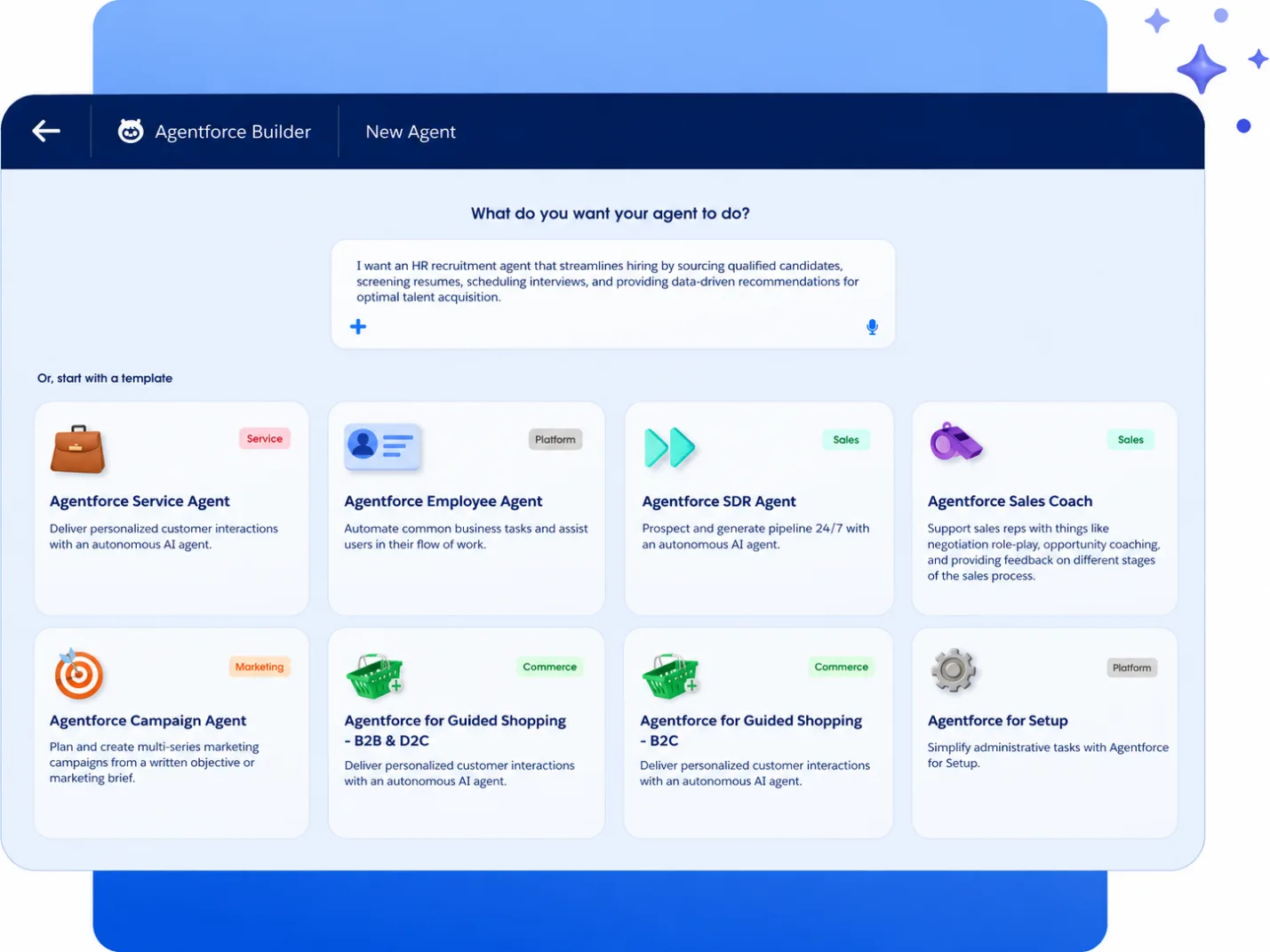
Salesforce provides ready agent templates inside Agentforce Builder. The public Agentforce Builder page shows templates such as Service Agent, SDR Agent, Sales Coach and Guided Shopping.
For this walkthrough, a Service Agent-style template is the closest fit. Think of a ready agent like a Salesforce template. It can save time and provide structure, but it still needs to be adapted to your process. Your business still needs to decide which data the agent can use, which actions it can run, how it should respond and how the outputs will be reviewed.
Step 1: Define The Job Before Building
Before configuring anything, write down what the agent should do in plain English. For the support case assistant, the purpose could be: Help internal service reps review customer cases, understand relevant context, suggest next steps and identify when escalation may be needed. This becomes the reference point for the build. If a proposed action or data source does not support that job, leave it out of the first version.
A useful first scope could include case and account context, knowledge articles, draft response suggestions, escalation recommendations and missing-information checks. Sensitive areas such as refunds, legal advice, contract changes and automatic case closure should remain controlled by the human team. In practice, the rep still owns the final decision, while the agent helps reduce the time spent searching for context.
Step 2: Create The Agent From A Template
Once the use case is clear, open Agentforce Studio or Agentforce Builder and start from the relevant template or setup flow. Trailhead shows Agentforce Studio as the place where teams can access the Agents panel and use the New Agent button to open Agentforce Builder.
Use a name that describes the job clearly: Support Case Assistant
A simple description is enough: Helps service reps review customer support cases, understand relevant context, suggest next steps and identify when escalation may be needed.
Avoid generic names like “AI Assistant” or “Customer Bot”. Users should know what the agent is designed to support before they start using it.
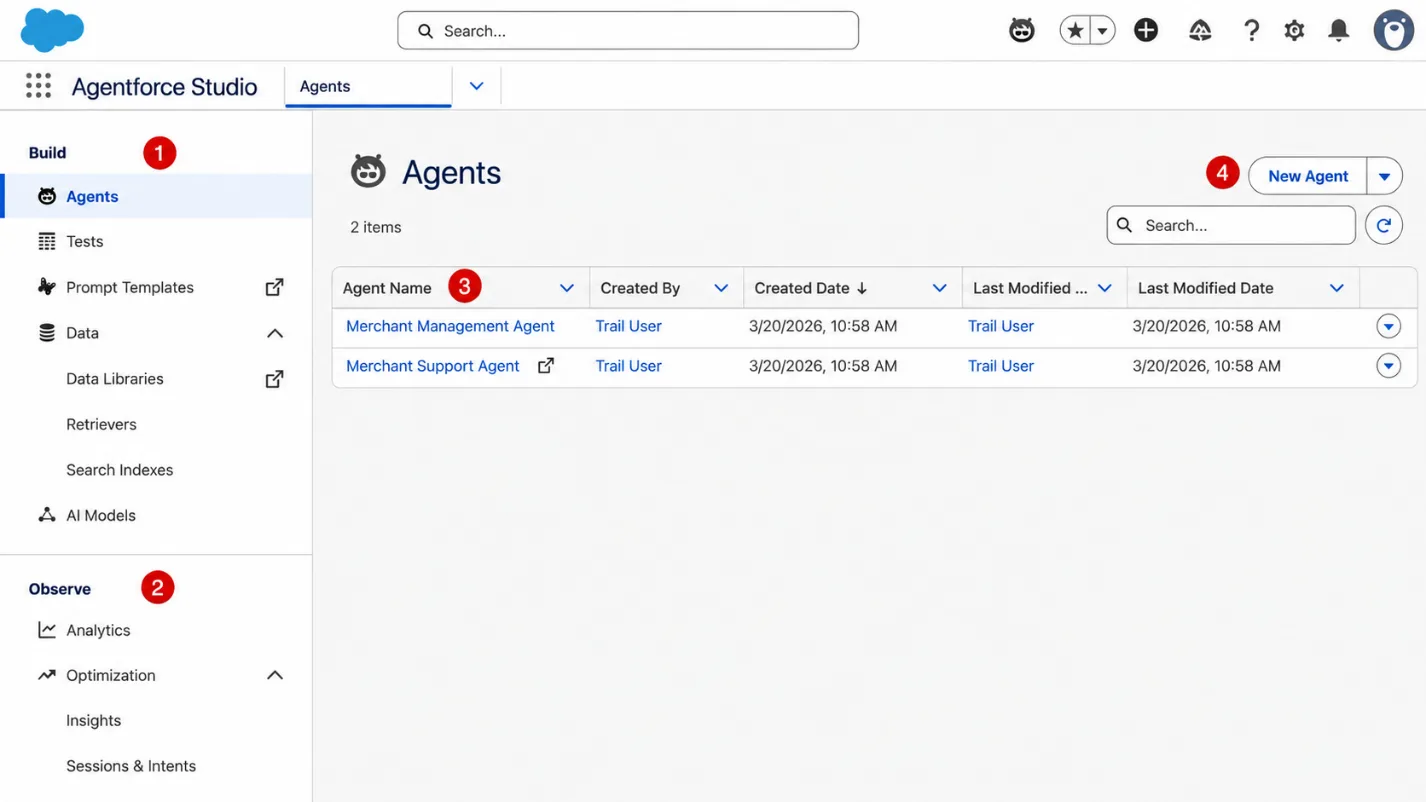
This screen highlights the main areas a team will use when starting with Agentforce. The Build section (1) includes agents, tests, prompt templates, data libraries, retrievers, search indexes and AI models. The Observe section (2) is used later for analytics and optimization. The Agents list (3) shows existing agents in the org, while the New Agent button (4) starts the setup flow for creating a new one.
Step 3: Write Instructions That Match The Process
Instructions are where the agent starts to reflect how the business works.
For our support assistant, the instructions could be written in plain English:
Use a clear and professional tone.
Start by summarising the customer issue.
Use available Salesforce case, account and contact context.
Suggest a next step the rep can review.
Recommend escalation for urgent, billing, legal or unclear issues.
Avoid promising refunds, credits or contract changes.
Do not close a case automatically.
When information is missing, say what is missing.
The first version is usually easier to manage when the instructions are short and specific. If the agent behaves poorly during testing, you can see more clearly which instruction needs to change.
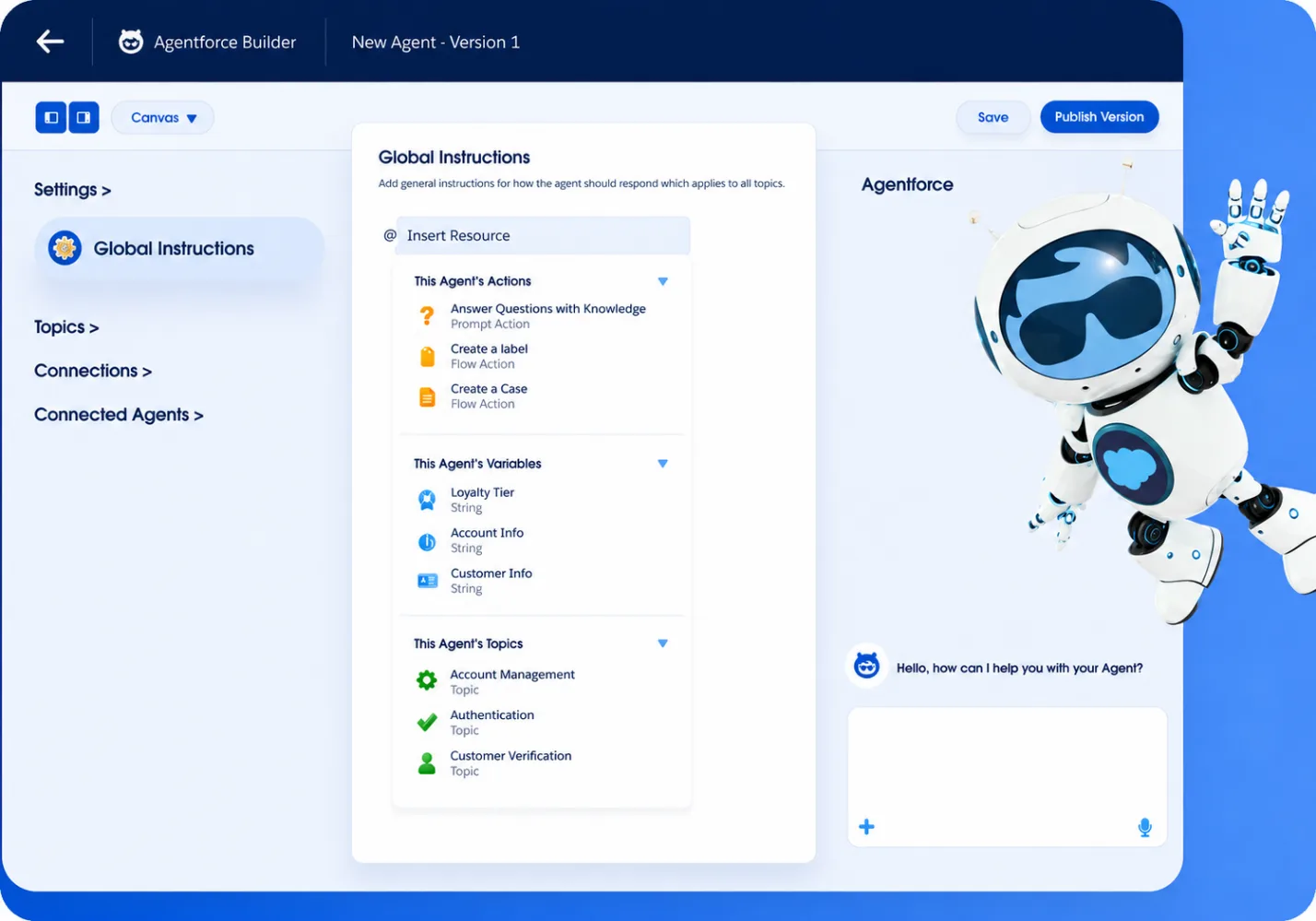
Agentforce Builder includes areas for instructions, subagents, actions, variables, preview and deployment, according to Salesforce Help.
Step 4: Connect Only The Data And Actions Needed
A support case assistant becomes useful when it can work with the right context. For this use case, that might include case details, account information, contact information, previous cases, knowledge articles, entitlement details and escalation guidance.
Start with the information the agent needs for this job. Connecting too much data early can make testing harder and increase risk. The same principle applies to actions. For a first version, low-risk actions are usually the best place to start:
retrieve case details
search knowledge articles
summarise case history
draft a suggested response
recommend escalation
create an internal note for review
Actions that affect customer records, billing, contracts or external communications need more care. Those can be added later if the first version proves reliable and the business is comfortable with the controls around them.
Before giving the agent more responsibility, review the quality of the data. Duplicate accounts, outdated knowledge articles, inconsistent case statuses or unclear ownership will affect the agent’s output. A simple check is whether a new support rep could use the same data confidently without needing extra explanation.
Step 5: Test With Real Support Scenarios
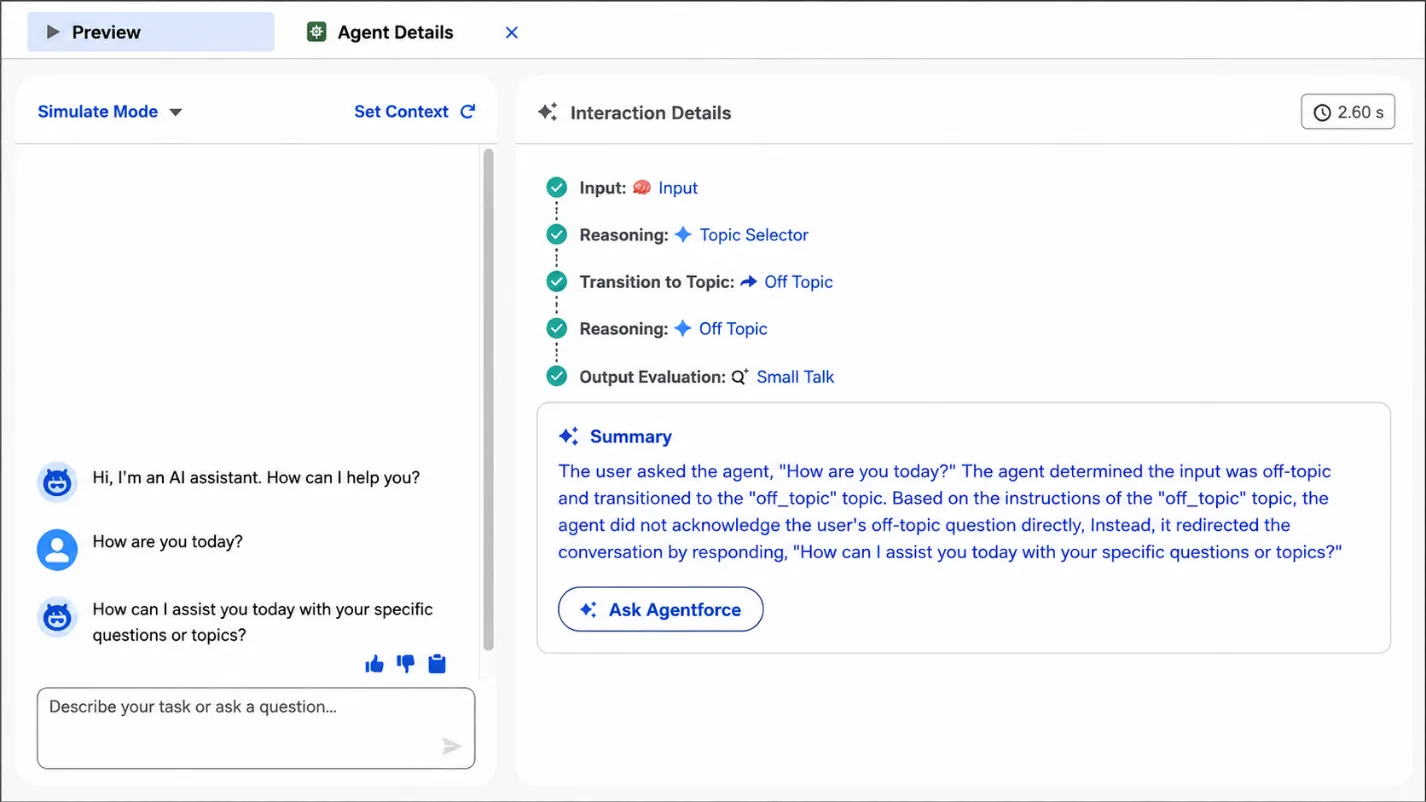
Testing should use the kind of cases your team actually handles. Salesforce Help explains that teams can use the Preview panel to chat with an agent and then review subagent selection, action execution and reasoning in the Interaction Summary panel.
For this support case assistant, useful test prompts could include:
“The customer says they were charged twice. What should I check?”
“Summarise this case and suggest the next response.”
“The customer is asking for a refund. What should the rep do?”
“The customer says this is urgent and they may cancel.”
“There is no account history available. What information is missing?”
During testing, look at the agent’s behaviour rather than only the wording of the answer. Check whether it uses the right Salesforce context, follows the instructions, avoids overpromising, recommends escalation correctly and gives an answer a real rep would trust.
When the output is not good enough, the fix is usually in one of three places: the instructions, the data available to the agent, or the actions it is allowed to use.
Step 6: Start With A Small User Group
The first rollout should be controlled. Choose a small group of service reps or team leads who understand the process and can give useful feedback. Ask them to test the agent against real cases and track where it helps, where it creates confusion and which responses need improvement.
Useful feedback points include whether the agent saved time, found the right context, produced usable suggestions, escalated at the right moment and made it clear when human review was needed.
This gives admins and business owners a clearer view of what to improve before a wider rollout. Once the first use case works well, the same pattern can be reused elsewhere: sales follow-up, renewal preparation, onboarding support or internal knowledge search.
Simple Agentforce Use Cases To Start With
The support case assistant is only one example. Many businesses may find an easier starting point in another team or process.
A sales follow-up assistant can help reps prepare for calls by summarising account context, open opportunities and recent activity. A renewal preparation assistant can collect renewal dates, open cases, account health and risks before the account owner contacts the customer. An onboarding assistant can guide internal teams through the first steps after a deal is closed, especially when handoffs between sales, finance and delivery are inconsistent. A knowledge helper can help employees find the right internal policy, process or article without searching through multiple systems.
The common pattern is that each use case has a clear user, clear data, clear actions and a way to test whether it actually helps. That is usually a safer starting point than launching a broad customer-facing agent before the business has learned how Agentforce behaves in practice.
How Appex Can Help You Get Started
Agentforce becomes easier to approach when the first use case is specific. At Appex, we help businesses identify where Salesforce AI can create practical value without making the first project too large. That can include:
For many businesses, the most practical starting point is a focused Agentforce package: one agent, one use case, clear instructions, controlled actions and a roadmap for what comes next. This gives the team a way to test Agentforce with real business value before expanding into more advanced use cases. The first build does not need to look impressive in a demo. It needs to solve a real problem for the people doing the work. If your business is exploring Agentforce, we can help you identify the right first use case, assess whether your data and permissions are ready, and design a safe starting point. That is how you build your first Agentforce agent without getting lost in the hype.